_edited.png)
How to Add Card Reader to Vending Machine

In 2024, cash represented only 14% of consumer payments in the United States, while credit cards accounted for 35%, debit cards for 30%, and mobile-phone payments averaged 11 transactions per consumer per month. The Federal Reserve's 2024 payment-choice data makes the operational point clear: adding a card reader to a vending machine isn't merely a convenience upgrade. It connects the machine to the way customers already expect to pay.
The difficult part isn't drilling a hole or plugging in a harness. A reader can power on and still fail to communicate with the controller, release a product after a declined authorization, lose transactions when cellular service drops, or create an inaccessible interface. A reliable retrofit treats the vending machine, payment terminal, processor, network, software, physical cabinet, and customer experience as one system.
The Business Case for Cashless Vending Upgrades
A cash-only machine asks customers to carry coins or bills, use exact change, and accept a slower purchasing process. That friction matters in an office break room, hospital corridor, school, airport, stadium, or manufacturing facility where people often want a drink or snack without stopping to search through a wallet.
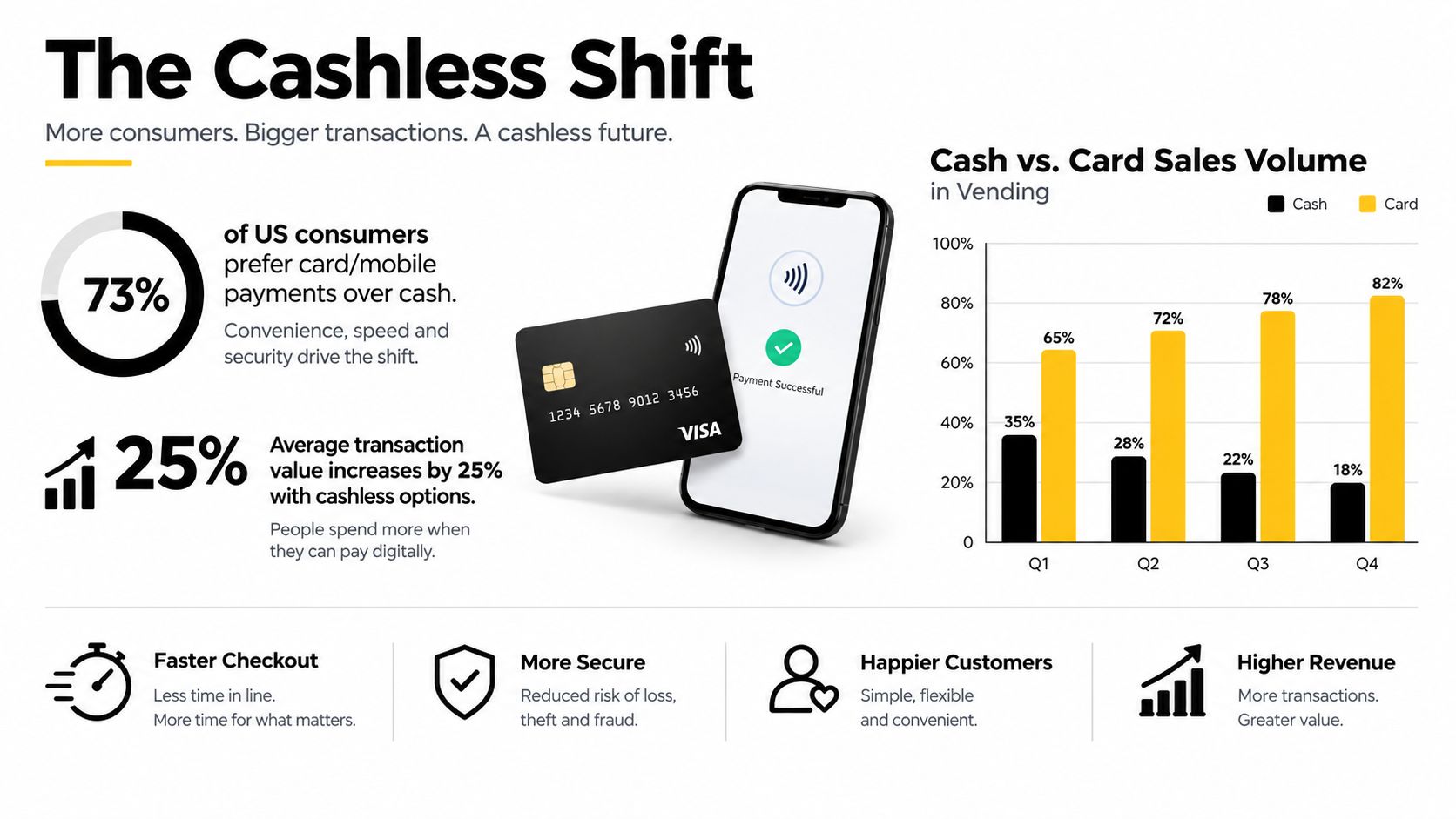
The payment mix has moved decisively toward electronic methods. Consumers made an average of 48 payments per month in 2024, and mobile-phone payments rose from an average of four transactions per month in 2018 to 11 in 2024, according to the Federal Reserve's Diary of Consumer Payment Choice. Mobile payments represented 23% of all U.S. payments in 2024, so a vending retrofit designed only for inserted cards misses a substantial part of the customer experience.
Why dual-interface acceptance matters
A modern vending terminal should support EMV chip cards, contactless cards, Apple Pay, and Google Wallet. The Federal Reserve Bank of Atlanta's review of mobile payments reports that mobile devices were used for 29% of all consumer payments in 2023, compared with 8% in 2018. In October 2023, mobile payments represented 10% of in-person payments, while 70% of consumers had made a mobile payment during the prior 12 months.
That doesn't mean every customer wants to use a phone. Some will insert a chip card, some will tap a physical card, and some will still use cash. The practical choice is a dual-interface reader, not a card-only accessory. A cashless upgrade should expand payment options while preserving the machine's existing operating logic and, where commercially necessary, its cash mechanism.
A benchmark cited in PCI Security Standards Council material indicates that roughly 75% of vending machines accepted noncash payments in 2023. Among cashless-capable machines, 94% accepted debit or credit cards and 88% accepted contactless payments. Those figures support a clear equipment decision for operators serving workplaces, schools, hospitals, airports, and stadiums: NFC capability belongs in the initial specification, not on a later upgrade list.
What the upgrade changes operationally
The reader must do more than authorize a charge. It needs to communicate with the vending controller so the machine can:
Authorize the purchase: Confirm that the processor approved the selected amount.
Release the product: Trigger the correct vend after authorization.
Detect a failed vend: Recognize when the product didn't dispense.
Reverse the transaction: Void or reverse the payment when the machine doesn't complete delivery.
Report activity: Send sales, diagnostic, and connectivity information to the operator.
That final capability turns a standalone machine into a connected service point. Cellular or network-enabled readers can help operators monitor payment failures, inventory signals, and machine uptime remotely. For a deeper explanation of the payment model, see this guide to what cashless payment means for vending.
Assessing Compatibility Before Installation
The most expensive retrofit mistake happens before the hardware arrives. An operator orders a reader because the product page says “MDB compatible,” then discovers that the cabinet uses a different interface, the existing harness is occupied, the panel has no clearance, or the cellular signal disappears behind the metal enclosure.
Start with a machine-model audit. Record the manufacturer, model, serial number, controller type, existing payment peripherals, available power, front-panel dimensions, and the location of the main control board. Take clear photographs of the controller, harnesses, inside of the door, and proposed mounting area. These records give the installer and payment supplier something more useful than a general statement that the machine is “older.”
Identify the controller protocol
Most modern vending machines use MDB, or Multi-Drop Bus, for communication between the controller and peripherals. Older equipment may use a serial interface, Executive protocol, pulse output, or a proprietary arrangement. Don't assume that a connector with a familiar shape proves protocol compatibility.
Ask the reader supplier to confirm all of the following:
Controller communication: The terminal supports the machine's actual protocol, not merely a similar connector.
Harness arrangement: A pass-through harness can preserve the coin mechanism and any existing bill validator or telemetry device.
Transaction logic: The controller can recognize authorization, selection, vend completion, cancellation, and reversal events.
Power requirements: The machine can supply stable power without overloading its existing circuit.
Processor certification: The terminal is certified for unattended transactions and supports the required EMV and contactless payment kernels.
Network operation: The cellular carrier, SIM profile, Wi-Fi, or Ethernet arrangement works at the final site.
A reader that only draws power isn't integrated. The true test is whether the controller and terminal agree on the complete transaction sequence.
Practical rule: Treat “reader powers on” as the beginning of testing, not evidence that the retrofit works.
Check the site, not just the machine
Metal cabinets can weaken cellular performance, and a strong signal outside the machine doesn't guarantee reliable communication inside it. Test connectivity with the cabinet in its final position, near the proposed antenna location, and with the door closed. If the site is a hospital basement, factory floor, stadium concourse, or airport service area, confirm the network conditions during the hours when the machine will be used.
Check physical clearance before ordering. A reader may fit the outer panel but collide with the coin mechanism, control board, insulation, product path, or door reinforcement on the inside. A curved door can also make contactless tapping awkward even when the terminal technically fits.
Connected equipment can provide useful operating data when the payment system and telemetry platform work together. The practical difference between a simple terminal and a monitored machine is covered in this overview of connected vending machines. Use that distinction during procurement, because a fragmented reader and telemetry setup can make reconciliation and troubleshooting harder.
Hardware Selection and Mounting Strategy
Choose the terminal around the machine and site, not around a feature list. An unattended vending reader needs EMV insertion, NFC contactless acceptance, processor certification, secure communications, and dependable controller integration. Magnetic-stripe fallback may still be commercially useful where permitted, but it shouldn't replace chip and contactless capability.
Select the mounting position first
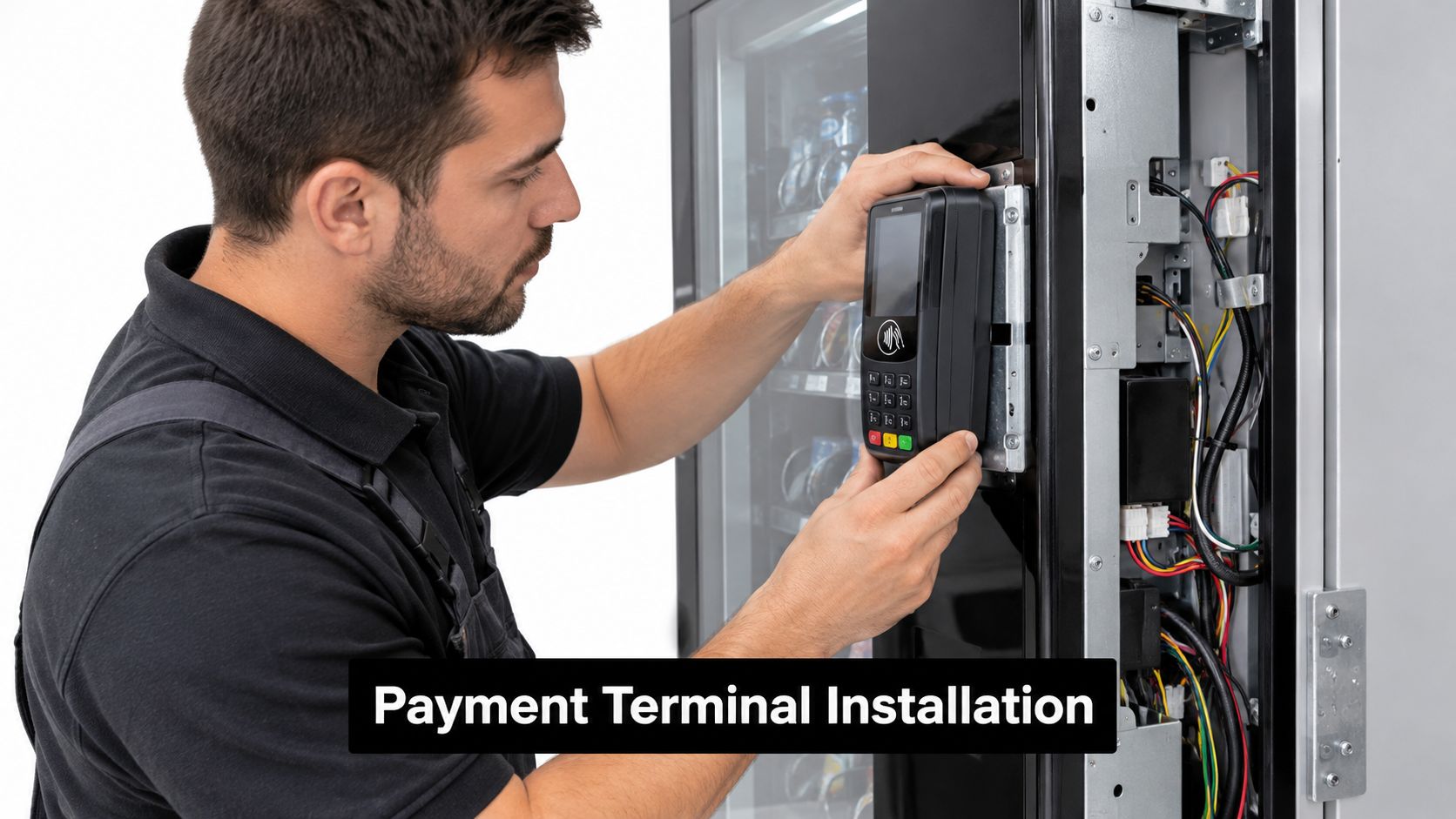
Hold the terminal template against the proposed panel and check both sides before cutting. The outside position should be visible, protected from impact, and easy to reach. The inside position should leave room for the connector, cable bend radius, mounting hardware, and service access.
Avoid placing the reader where:
The door edge can pinch the cable: Repeated opening and closing will eventually damage insulation or loosen a connector.
A product tray blocks access: Customers shouldn't have to reach around a protruding feature to tap or insert a card.
A nearby object obstructs approach: A wall, pallet, trash can, queue rail, or furniture can make an otherwise suitable reader difficult to use.
The reader sits in a vulnerable recess: Deep recesses can encourage tampering and make inspection difficult.
The antenna is trapped against metal: Poor placement can undermine network reliability.
Secure the reader with the supplied mounting plate, protective frame, and appropriate fasteners. A loose terminal creates stress on the harness every time a customer taps or inserts a card.
Route wiring like a service technician will inspect it
Power and communications wiring should run inside the cabinet or through protected conduit. Keep cables away from sharp edges, refrigeration components, moving mechanisms, hinges, and areas where products or tools can snag them. Use suitable clips or retainers, leave enough service slack to remove the door panel, and avoid bundling cables so tightly that a technician can't trace them later.
The cashless payment terminal installation guidance is useful when comparing reader types and mounting arrangements. The important distinction is that a clean installation supports future service. A terminal that works only while the harness is held at one angle isn't ready for a route environment.
Review the physical layout again after tightening every fastener. Confirm that the card slot, tap area, display, keypad, and any error instructions remain readable. A technically secure terminal can still produce failed purchases if customers can't identify where to tap or insert their card.
Wiring and Electrical Integration
Power the machine down and disconnect it before opening the cabinet or touching the controller harness. The installation manual for the selected terminal should control the exact pinout and connection sequence. Never rely on wire color alone, especially when working on a mixed fleet assembled across different years.
Locate the MDB or approved legacy interface and identify any existing peripherals. A pass-through harness can allow the new reader to communicate with the controller while preserving the coin mechanism, bill validator, or other approved equipment. Confirm the final device order with the terminal documentation, because some machines require a specific peripheral arrangement or configuration setting.
Build a protected cable path
Route the harness away from the door hinge, vend motors, refrigeration hardware, sharp cabinet edges, and service panels that technicians regularly remove. Protect penetrations with suitable grommets or conduit, secure the cable so it can't rub during door movement, and leave enough slack for maintenance without creating a loop that can catch on a product tray.
Before restoring power, check:
Connector seating: Every plug is fully inserted and mechanically secure.
Polarity and pinout: The wiring matches the approved terminal and machine documentation.
Physical protection: No cable is exposed to abrasion, heat, moisture, or moving parts.
Peripheral continuity: Existing coin and bill equipment still has its intended communication path.
Grounding and enclosure condition: The cabinet and electrical components remain properly protected.
The software side starts when the reader communicates with the controller. Configure the machine's prices and selection map so the amount authorized matches the product selected. Then confirm that the processor can receive the terminal's authorization request and that the terminal can receive the controller's vend result.
A vending cabinet also needs controlled physical access during service. Teams reviewing locks, technician entry, and cabinet protection may find this guide to controlling site access useful as a broader facilities reference. Payment wiring should never be treated as an exposed accessory that anyone can reach by opening an unsecured panel.
Payment Processor and Software Configuration
The terminal, processor, connectivity method, and vending software form an ecosystem. A good hardware choice can still perform badly if the account isn't enabled for unattended transactions, the product map is wrong, or the reader can't send a reversal after a failed vend.
Compare the main connectivity approaches according to the site:
Configuration | Where it fits | Main trade-off |
|---|---|---|
Cellular reader | Locations without dependable customer or facility network access | Requires carrier coverage and a suitable SIM or network profile inside the cabinet |
Ethernet connection | Facilities with a stable, managed network connection near the machine | Requires network access, cable routing, and coordination with the site |
Wi-Fi connection | Sites that provide reliable coverage and support the terminal's security requirements | Performance depends on the facility network and local configuration |
Integrated payment and telemetry | Operators who need transaction, inventory, fault, and uptime visibility in one platform | Requires a compatible ecosystem and careful device registration |
Cellular is often simpler for a distributed route, but metal cabinets and difficult locations can reduce reliability. Ethernet may provide a strong fixed connection but can introduce site-access and cable-management issues. Wi-Fi can work well in a managed facility, yet operators shouldn't assume that a guest network or changing password will support unattended equipment.
Configure the transaction sequence
Register the terminal with the processor and record the device serial number, firmware version, merchant or acquirer identifier, machine identifier, SIM or network profile, and controller interface. Configure the machine's selection map and prices so every button, tray, or slot corresponds to the correct charge.
Enable Apple Pay, Google Wallet, NFC cards, EMV insertion, and any permitted fallback method that the site needs. Configure online and offline behavior with care. Offline operation can preserve limited service during a temporary network interruption, but the processor, terminal, and merchant account must define the permitted rules. An operator shouldn't invent an offline policy by leaving a device disconnected.
The system must also handle cancellation, declined authorization, insufficient inventory, door-open events, duplicate-vend prevention, and failed dispensing. A successful authorization isn't the same as a completed sale. The controller needs to report the vend result so the processor can settle the purchase or reverse it appropriately.
For broader payment-account considerations, this guide for international SaaS merchants offers useful context on accepting card payments across different commercial setups, although vending still requires unattended-terminal certification and machine-controller integration. For vending-specific visibility, smart vending machine software can help operators connect payment activity with inventory and machine status instead of managing isolated reports.
Set up remote monitoring for heartbeat, signal strength, transaction errors, power faults, door tamper events, and the last successful settlement. Record the alert path and assign responsibility. A notification that nobody owns won't reduce downtime.
Testing and Compliance Commissioning
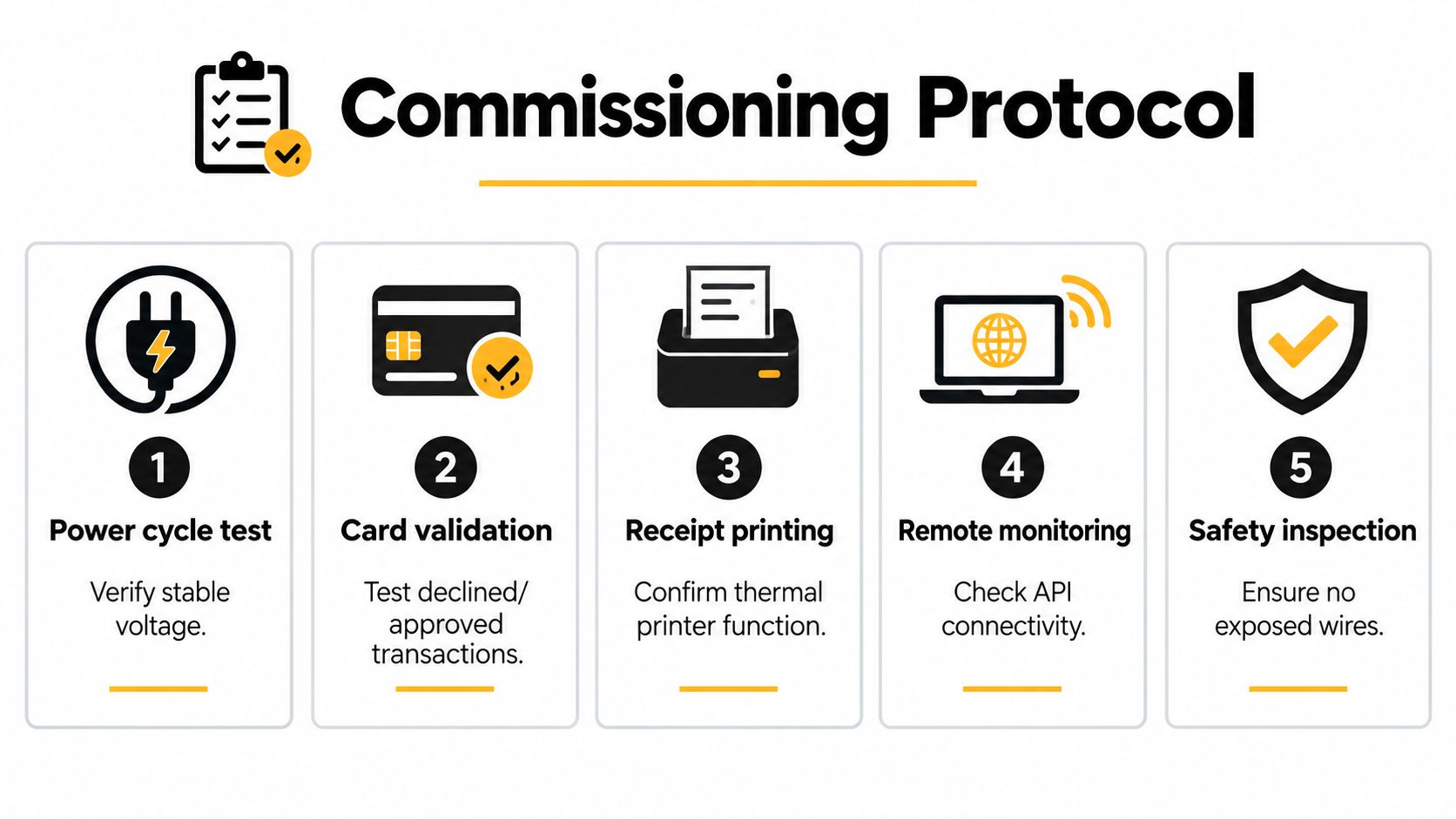
Commissioning should prove the entire transaction chain, not just the terminal display. A machine is ready when it accepts the intended payment, authorizes the correct amount, releases the selected product, records the result, and recovers safely from errors.
Begin with a controlled power-cycle test. Confirm stable operation after startup, verify that the reader reconnects to the network, and check that the machine returns to an idle state without repeating a transaction. Then test the machine with real operating conditions, including a closed cabinet, the final product load, and the actual network position.
Test every payment path
Use a written script rather than an informal tap at the end of installation. The acceptance test should include:
Approved chip transaction: Confirm the correct product dispenses and the processor records the sale.
Approved contactless transaction: Test an NFC card and verify the tap area is clear and responsive.
Mobile wallet transaction: Test Apple Pay and Google Wallet where enabled.
Declined authorization: Confirm that the machine doesn't release a product and displays a usable message.
Interrupted connectivity: Test the configured online and offline recovery behavior.
Insufficient inventory: Select an unavailable product and verify that the customer isn't charged incorrectly.
Failed vend: Simulate or safely test a dispensing failure and confirm reversal or void behavior.
Duplicate-vend prevention: Ensure one authorization can't release multiple products.
Settlement and reporting: Reconcile the machine record, processor record, and telemetry event.
A practical acceptance standard is 100% successful completion of the scripted approved, declined, reversal, timeout, and offline-recovery scenarios before fleet rollout. During the first 30 days, monitor authorization rate, failed-vend rate, chargebacks, and reader uptime by machine, as recommended in cashless vending security and monitoring guidance.
Check accessibility and physical security
ADA-oriented guidance identifies a 30-by-48-inch clear floor space and places operable components, including payment interfaces, approximately 15 to 48 inches above the floor. Controls should be usable with one hand and without tight grasping, pinching, or twisting, according to the accessibility guidance for wall-mounted vending equipment.
Measure the highest operable point of the installed reader, not the height shown in a product brochure. Check the clear approach space, seated-height readability, tap placement, chip insertion, keypad use, and error messages. A bracket can push a terminal outside the intended reach range, while a nearby trash can or queue rail can eliminate the approach space.
Security inspection should be part of commissioning and ongoing service. PCI Security Standards Council guidance recommends physically securing unattended terminals, protecting cables and communications infrastructure, limiting access to payment components, and inspecting for tampering. Compare the reader with approved photographs, inspect seals and mounting screws, look for overlays or unexpected attachments, verify that cables haven't been rerouted, and reconcile telemetry with processor settlement.
For a focused review of payment threats and controls, use this mobile payment security guidance. Keep a commissioning record with the terminal serial number, firmware, merchant ID, machine ID, network profile, controller interface, test results, photographs, and sign-off from the responsible technician.
Vendmoore Enterprises installs and configures cashless vending systems for Oklahoma workplaces, schools, healthcare facilities, manufacturing sites, residential properties, stadiums, and airports, including readers that support contactless cards, Apple Pay, and Google Wallet. If you're evaluating a retrofit or a managed break room vending program, visit Vendmoore Enterprises to discuss machine compatibility, secure installation, telemetry, and ongoing service.
Comments