_edited.png)
Roll Your Own Machines Guide for Break Rooms

A lot of people start in the same place. The break room is underperforming, employees complain that the machine is half empty or full of the wrong snacks, and the outside vending company only shows up when somebody gets loud enough. So the question turns into, should we just buy our own machine and control it ourselves?
That's where most “roll your own machines” advice goes sideways. It treats ownership like a one-time equipment purchase. In real life, owning a vending machine for a workplace is closer to running a small retail operation inside your building. The machine matters, but the bigger money decisions are product mix, payment setup, service rhythm, refrigeration fit, permits, and whether you have the data to keep the thing profitable.
In Oklahoma break rooms, I've seen both sides. Ownership can absolutely make sense for offices, schools, healthcare sites, apartment common areas, and industrial facilities. But the winners don't just buy hardware. They run the machine like a business.
Why Businesses Choose to Own Their Vending Machines
The most common reason a business looks at roll your own machines isn't vanity. It's frustration.
A property manager wants healthier snacks in a tenant lounge, but the current operator keeps loading slow sellers nobody asked for. A plant manager wants drinks priced fairly for second shift, but service calls drag out. A clinic wants better control over what sits in a waiting area. In each case, ownership starts to look attractive because it gives the site control over product mix, pricing, service standards, and machine access.
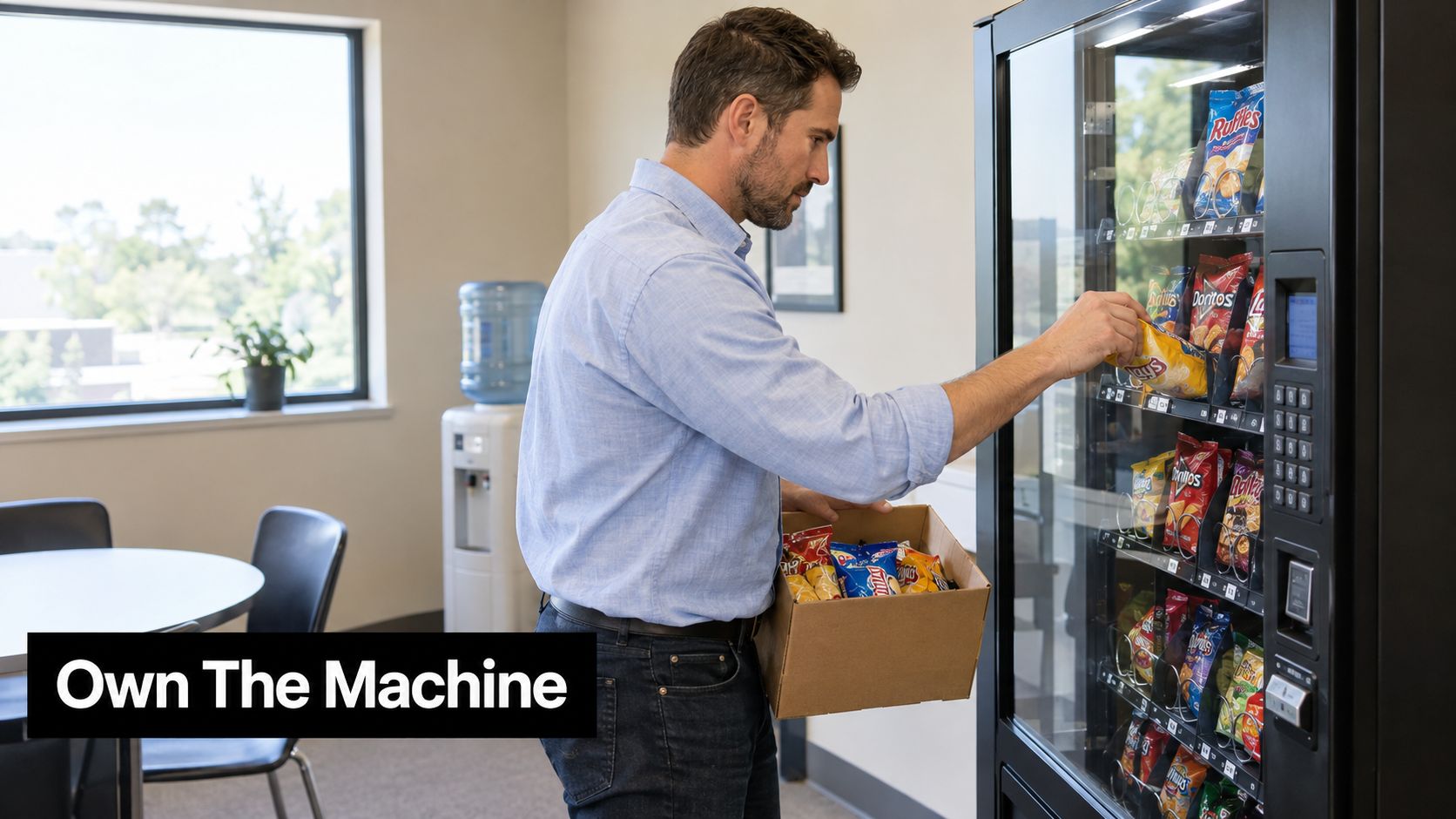
What ownership really changes
When you own the machine, you decide whether the break room carries energy drinks, protein bars, frozen meals, or basic value snacks. You can react faster to employee requests. You can keep pricing aligned with your workplace culture instead of waiting on a route operator with dozens of other stops.
That control is useful, but it comes with work. Somebody has to handle restocking, basic cleaning, machine resets, payment issues, refunds, and product rotation. If the machine accepts cards and mobile wallets, somebody also has to stay on top of the reader, software, and connectivity.
Practical rule: If you want the upside of ownership, plan for operations before you plan for equipment.
That's why I usually tell people to compare ownership against a managed model in plain business terms, not pride. A machine that you own but don't service well will lose trust fast. A machine with fewer products, better uptime, and cleaner replenishment usually beats a machine with bigger capacity and sloppy follow-through. That same logic shows up in any honest vending cost comparison analysis.
Who usually benefits most
Ownership tends to work best when the location has a stable audience and somebody on the business side wants more control.
A few strong fits:
Office campuses: Better for curated assortments, cashless checkout, and employee-driven changes.
Schools and colleges: Useful when administration wants tighter oversight on product categories and machine placement.
Healthcare sites: Strong fit when sanitation, reliability, and refrigerated products matter.
Manufacturing and industrial facilities: Often worth it when shift demand is predictable and after-hours access matters.
What success looks like in the first stretch
The first phase isn't about filling every slot. It's about proving the machine belongs there.
Good ownership usually looks like this early on:
Tighter assortment: Start with products people already buy elsewhere on site.
Reliable service rhythm: Refill before obvious stockouts become normal.
Fast adjustments: Remove slow movers quickly instead of defending bad picks.
Visible payment convenience: If employees can tap and go, usage usually becomes easier to sustain.
A profitable machine isn't the one with the most selections. It's the one people trust to work, stay stocked, and carry the right items.
Choosing the Right Ownership Model and Machine Type
Some businesses should buy outright. Some should lease. Some should own the machine but still get outside help with stocking, maintenance, or telemetry. The right answer depends less on preference and more on how much operational responsibility you're ready to carry.
Ownership models that fit real sites
If you've got a facilities team, purchasing process, and somebody who can manage weekly oversight, outright ownership can work well. You'll have the most control, but you'll also absorb repair timing, payment setup, and inventory discipline.
Lease-to-own can soften the upfront hit. That can help when a business wants control but doesn't want to commit all the capital on day one. The downside is simple. If the site's demand never matures, you're still carrying an obligation on equipment that may not be earning well enough.
Then there's the hybrid route. Some locations want the machine under their ownership but don't want to handle every moving piece in-house. That's where a support arrangement can make sense. For example, Vendmoore Enterprises offers options for clients who want to own machines while still getting operational support where needed. That model is often easier to evaluate when you've already looked at different vending revenue sharing models and ownership structures side by side.
Ownership Models and Machine Types Compared
Option | Best For | Control Level | Key Trade-off |
|---|---|---|---|
Outright ownership | Stable sites with internal oversight | High | You handle service burden and operating discipline |
Lease-to-own | Businesses that want lower upfront commitment | Medium to high | Longer payback path if usage is weaker than expected |
Owner with operator support | Sites that want control without full self-management | Medium to high | Less DIY independence, but easier execution |
Compact refreshment center | Smaller offices and low-footprint break rooms | Medium | Limited product depth |
Bottle and can vendor | Beverage-heavy traffic | Medium | Doesn't solve snack or meal demand by itself |
Dual-zone chill center | Mixed drink and fresh-item demand | High | More complexity in refrigeration and merchandising |
Frozen food machine | Plants, hospitals, and after-hours access | High | Higher service stakes if temperature issues show up |
Matching machine type to the location
A 30-person office usually doesn't need a giant machine bank. In that environment, a compact refreshment center or a smaller snack and beverage setup is often the smarter choice. You want enough capacity to avoid constant refill trips, but not so much empty space that the machine looks picked over or stale.
A high-traffic manufacturing break room is different. There, drinks move fast, shift timing matters, and meal replacement products may matter more than novelty snacks. Dual-zone chilled equipment or a frozen food machine can make more sense if the site runs beyond normal lunch windows.
Here's what I'd look at before choosing:
Footprint and access: Don't buy a machine that barely fits the room or blocks circulation.
Power and refrigeration needs: Cold and frozen formats bring better product range, but they also bring more responsibility.
Cashless readiness: If the machine can't support modern payment hardware cleanly, I'd pause.
Service cadence: The bigger the machine and the broader the mix, the more expensive sloppy replenishment becomes.
Smaller sites usually lose money by overbuying machine capacity. Busy sites usually lose money by underbuying refrigeration and meal capability.
What doesn't work well
Two mistakes repeat over and over.
First, buying based on machine appearance instead of use case. A nice glass front doesn't fix poor product fit. Second, choosing equipment before you decide who will own stocking, pricing updates, refunds, and technical support. If those decisions stay fuzzy, the machine becomes a blame magnet.
Site Assessment Permits and Installation Essentials
A bad installation creates problems that never really go away. I've seen good machines underperform because they were shoved into a dead corner, put too close to a doorway swing, or dropped in a spot with poor power access and no room to service the front.
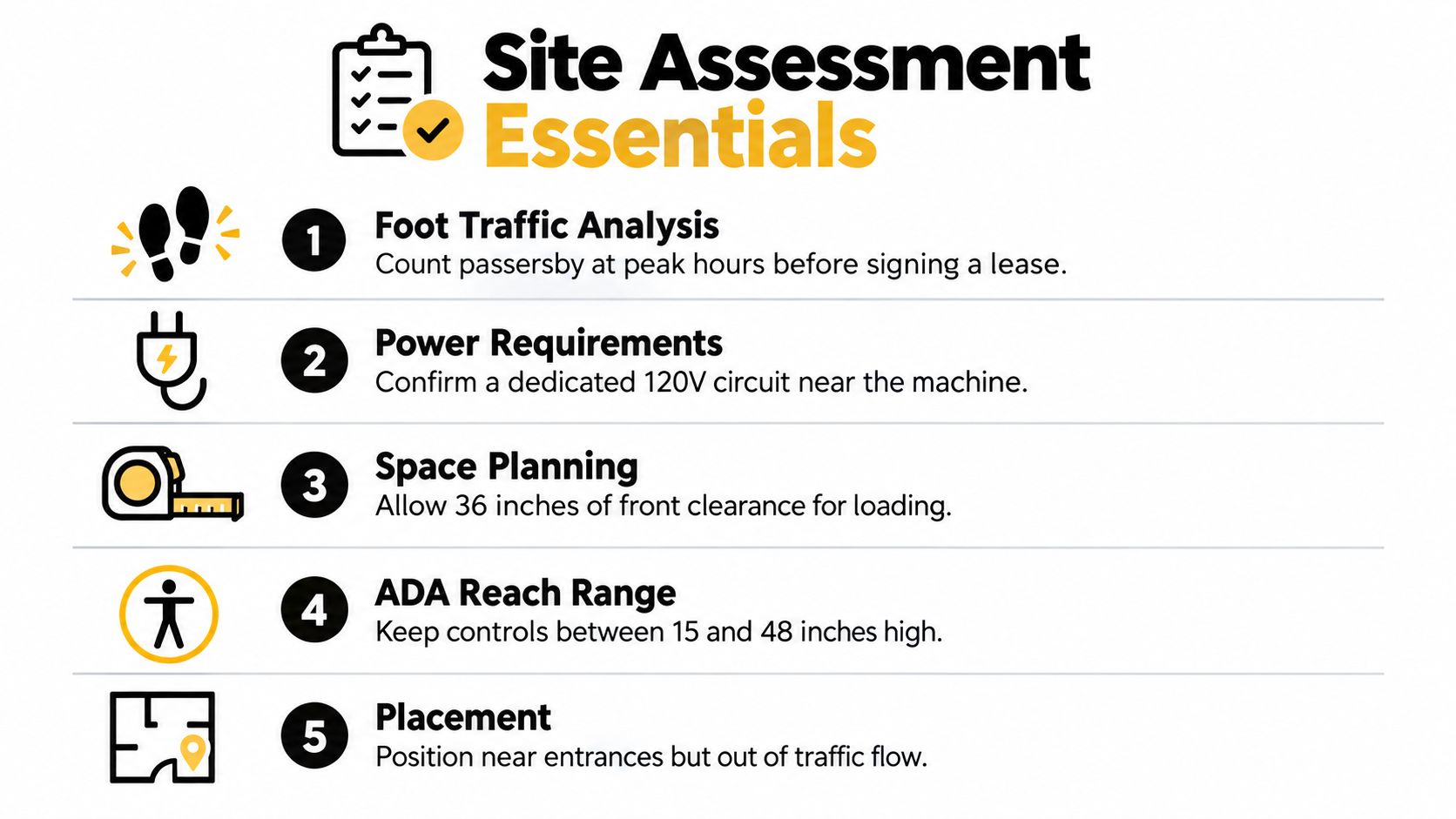
Start with the site, not the machine
Before any machine gets ordered or moved in, I want answers to five practical questions.
Where does foot traffic naturally slow down A machine sells better where people already pause, gather, or pass during routine breaks.
Is the power right You need dependable nearby power, not a setup that depends on a sketchy workaround.
Can the machine be loaded and serviced cleanly If the front clearance is cramped, routine restocking turns into a hassle.
Will people reach and use it comfortably Accessibility isn't optional. Controls and access points need to be placed thoughtfully.
What happens around the machine during peak use If the area clogs up during break changes, the machine placement is wrong even if it technically fits.
A clean install process usually starts with measurements, traffic observation, and a simple path plan for delivery. If you're comparing your own checklist against a service partner's process, a basic vending machine installation process should cover site review, placement, power confirmation, and startup testing.
Permits and compliance people skip too often
This is the part many ownership guides barely touch, and it matters more than people think.
Neutral legal guidance notes that most operators need at least a business license, seller's permit, and sometimes a health permit, with added rules when the machine includes perishable products. The same guidance also points to accessibility requirements such as reach ranges for operable parts, which becomes important for self-owned machines in public or employee-facing areas. That's laid out in this overview of vending permits and accessibility considerations.
If you're putting in snacks only, your compliance load may be simpler. If you're mixing beverages, fresh food, refrigerated products, or frozen meals, the responsibility stack gets heavier. Food safety, temperature reliability, sanitation routines, and placement standards all become part of ownership.
If you skip permit questions until after delivery, you're already late.
A pre-install checklist that saves headaches
Use a plain checklist before install day:
Measure the path: Check doors, hallways, turns, elevator access, and final footprint.
Verify the floor: Uneven surfaces cause more trouble than people expect.
Confirm electrical access: The machine needs power where it will live.
Review accessibility: Controls, payment hardware, and usable approach area all matter.
Check local approvals: Don't assume the machine type you want is automatically fine for that building.
Placement mistakes that cut sales
Some placements look neat on paper and perform badly in real life.
Avoid these:
Hidden corners: People don't buy what they don't see.
Crowded entrances: Good visibility matters, but bottlenecks create frustration.
Remote staff-only areas with weak usage: Convenience should match the audience.
Warm spots for temperature-sensitive machines: Heat load makes refrigerated service harder.
A machine in the right spot sells with less effort. A machine in the wrong spot asks you to solve the same problem every week.
Setting Up Cashless Payments and Telemetry for Real Time Control
Monday at 9:15 a.m., the card reader goes offline, the best-selling row is empty by lunch, and nobody knows until employees start complaining. That is the difference between owning a machine and running a vending operation. If you want these machines to earn, you need payment hardware that works every day and reporting that tells you what needs attention before the location does.
Cashless payment is part of the base setup now. In break rooms, plenty of buyers never carry bills, and they expect tap to work on the first try. Analysts at Mordor Intelligence project growth in the North America and Europe vending market, with mobile wallet and QR-code transactions growing faster than the overall category, according to Mordor Intelligence's vending market outlook.
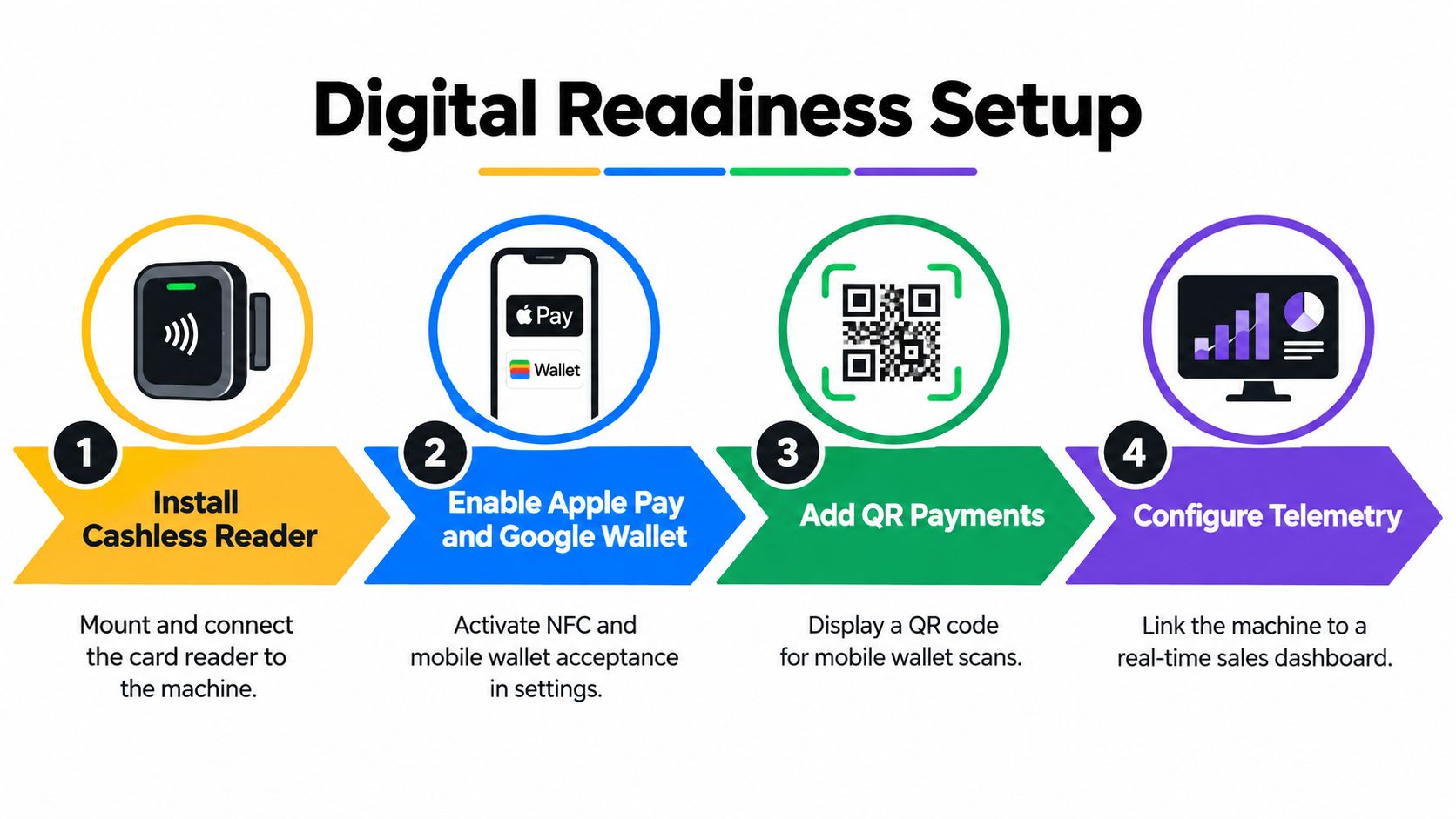
Cashless should carry the load
I treat cashless as the primary sales lane and cash as a secondary option. That approach fits how people buy, and it cuts one of the most common service headaches. Bill validators jam, coin mechanisms need more cleaning, and cash collection adds shrink risk and labor that owners tend to underestimate.
There is still a trade-off. Some plants, older facilities, and mixed-workforce sites still need cash acceptance to avoid leaving sales on the table. The practical move is to install a reader that handles tap cards and mobile wallets first, then decide whether the location justifies the extra maintenance that comes with cash.
Set the stack up in the right order
A lot of owners buy the machine first and figure out the controls later. That usually leads to a reader that sort of works, a portal nobody checks, and no clear view of what the machine is earning.
Use this order instead:
Install a compatible card reader: Confirm it integrates cleanly with the machine controller and is mounted where buyers can see it fast.
Turn on tap and mobile wallet acceptance: If the hardware supports Apple Pay and Google Wallet, activate it before launch.
Set up your merchant account and settlement flow: Know your processing fees, funding timing, chargeback process, and who to call when a reader drops.
Connect telemetry from day one: A machine that can take payment but cannot report inventory, errors, and offline status still leaves you driving blind.
Test live transactions on site: Run real purchases, confirm vend success, and make sure the sale shows up correctly in the back end.
Here's a look at the kind of digital workflow owners should understand before rollout:
If you are building your operating stack, your telemetry data collection process should show product movement, payment status, machine alerts, and refill timing in one place.
Telemetry earns its keep when it changes decisions
Telemetry is not just a dashboard for checking yesterday's sales. It is the control layer for a small unattended retail business. Research and Markets expects the vending machine telemetry market to grow through 2031, with demand tied to real-time monitoring, cashless adoption, and operating efficiency, according to Research and Markets coverage of vending telemetry. Vendon also notes that the connected machine base is growing because operators are using data to manage service and payment performance, as outlined in Vendon's connected vending trend review.
What matters is what you do with it.
Good telemetry should help you:
Catch stockouts before the site complains: Empty spirals cost sales and train people to stop checking the machine.
Cut wasted trips: Service stops should follow actual sales and alerts, not habit.
See payment failures quickly: A dead reader can cripple a good location in a single shift.
Watch refrigeration and machine health: For cold food and beverages, this is part margin protection and part compliance discipline.
Rationalize SKUs by location: A warehouse break room, office lobby, and hospital staff area do not need the same mix.
The operators who make ownership work do not make money because they bought hardware. They make money because they set up a controlled micro-operation with working payments, usable telemetry, and enough visibility to price, stock, and service the machine like a business.
Stocking Pricing and Service Routines That Protect Margin
Monday at 9:00 a.m., the office manager says the machine is always half empty by Friday, refunds are piling up, and nobody wants the dusty protein bars in the bottom row. That is not a hardware problem. It is an operating problem.
Owners lose margin in familiar ways. They buy too many SKUs, set prices off retail shelf logic, and service the machine on a fixed habit instead of what the location sells. If you own the machine, you are running a small unattended retail operation. The money comes from controlling mix, price, visit timing, spoilage, and payment friction at the site level.
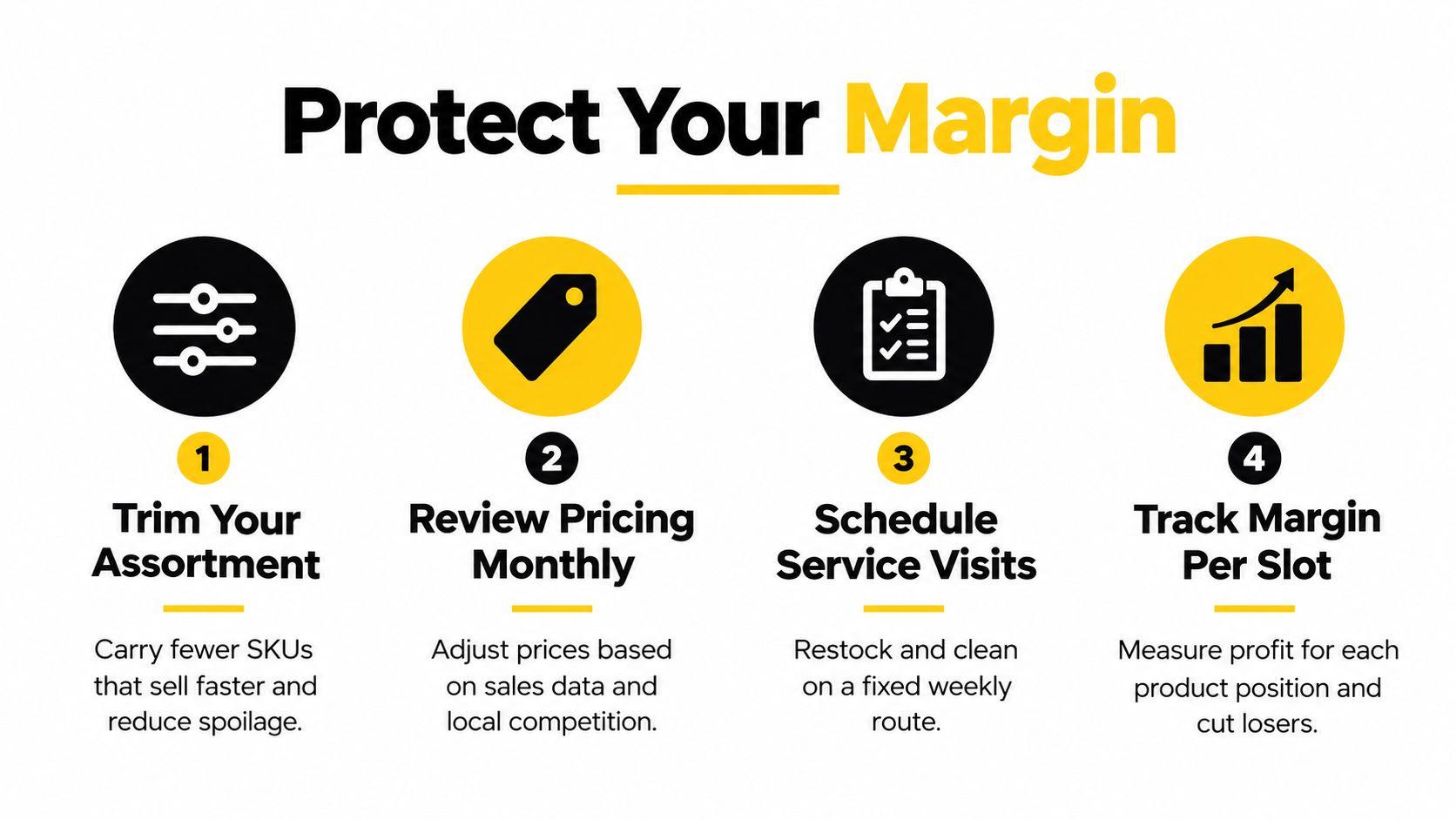
Fewer SKUs usually mean better turns
A packed machine looks good the day it is filled. Three weeks later, it often turns into dead space. Slow items age out, popular items sell out, and the person servicing it wastes time trying to keep fringe products alive.
A tighter mix fixes that.
Top sellers stay in stock more often
Expired or stale product risk drops
Each slot has to earn its place
Replenishment gets faster and more consistent
A disciplined vending machine planogram helps keep that discipline in place. Slotting is not cosmetic. It decides whether the machine produces cash or ties it up in weak inventory.
The practical test is simple. If an item needs repeated chances, repeated markdowns, or repeated excuses, pull it and give that space to a proven seller.
Price for service burden, not grocery math
A lot of first-time owners underprice because they compare their machine to a supermarket shelf or a club store case price. That misses the cost stack.
The machine has to pay for delivery time, reader fees, refrigeration, cleaning, refunds, spoilage, and the labor it takes to keep the location usable. In food and drink, compliance pressure matters too. If cold product sits too long or temperatures drift, margin disappears fast.
Set pricing with the actual route burden in mind:
How often the machine needs service
Whether the item is perishable or temperature-sensitive
Card processing costs and reader support
How often customers request refunds
How much waste slower items create
I have seen plenty of machines with decent sales and weak profit because the owner was proud of low prices. Low price does not help if every restock trip eats the margin.
Field note: Fair pricing means the customer gets a clean, working, dependable machine, and the owner keeps enough margin to service it properly.
Service routines protect both sales and compliance
Good service routines are boring on purpose. That is what you want. The machine should not surprise you with expired product, filthy buttons, empty best sellers, or a cooler issue somebody noticed two days ago.
Strong routines usually include:
A set review day Check what moved, what stalled, and what needs to come out before it becomes a problem.
Priority treatment for high-turn slots Best sellers get checked sooner because empty columns train people to stop buying.
Cleaning on every visit Smudged glass, sticky keypads, and dirty delivery bins make the machine look neglected.
A simple site feedback habit Give one contact at the location an easy way to report refunds, product requests, and recurring issues.
Date checks on anything with tighter shelf life This matters most in combo machines and food programs, where old inventory turns into both margin loss and compliance risk.
What to track each month
Do not build a giant spreadsheet just to feel organized. Track a short list and act on it.
Best sellers by slot
SKUs with slow movement
Refund requests
Repeat service issues
How often visits happened too early or too late
Waste from expired or unsellable product
That is the ownership angle a lot of buying guides skip. The machine itself is the cheap part compared with the cost of running it poorly. Profit comes from rational SKU count, pricing that covers real service, and routines that keep the location dependable week after week.
Keeping Machines Profitable and Growing Your Break Room Program
Once the machine is running, the next challenge is staying out of reactive mode. That's where preventive maintenance and local visibility start pulling together.
On the machine side, the lesson from self-checkout applies more than people expect. Industry coverage says self-checkout systems often carry hidden maintenance and shrink pressure, with reported losses around 3.5% of sales, annual maintenance often around $1,000 to $3,000+ per unit, and common failure points including cash-handler jams, scale drift, and software freezes, according to this self-checkout operations summary. A separate discussion says more than half of users may need employee assistance and cites industry coverage of theft occurring about four times as often at self-checkout kiosks compared with traditional lanes, according to this review of self-checkout hidden costs.
Your vending machine isn't the same format, but the operating lesson carries over. Unattended retail only stays efficient when somebody owns exception handling, updates, calibration, and maintenance discipline.
What to handle in-house and what to escalate
Some issues are routine. Others should go straight to a qualified tech.
Handle internally when it's basic:
Simple reset and reboot issues
Light cleaning and cosmetic upkeep
Routine restocking and product rotation
Obvious sold-out corrections
Escalate when the issue affects reliability or food safety:
Cooling inconsistency
Payment reader communication failure
Door, lock, or vend motor problems
Repeated software lockups
Growth comes from operations and search visibility
If you want more break room vending business, local search matters. One local SEO source states that businesses in the Google Local Pack receive 126% more traffic than businesses appearing only in organic results, according to SearchLab's local SEO statistics page. For owners and operators trying to grow in Oklahoma City, Norman, and Edmond, that means your Google Business Profile, service area clarity, photos, and review flow deserve real attention.
A vending website doesn't grow just because it exists. It grows when the operation behind it looks real, local, current, and dependable. That means pages that speak to break room vending, office snack service, school vending, healthcare vending, and client-owned machine support in the language buyers search for.
A simple 30 60 90 day approach
Keep it practical.
First 30 days
Verify uptime, payment function, stocking rhythm, and placement fit.
Remove obvious weak sellers quickly.
By 60 days
Tighten assortment.
Review service frequency against actual machine activity.
By 90 days
Decide whether the site justifies expansion, added machine types, or outside support.
Tune your local web presence so nearby buyers can find your vending service when they search.
Good growth doesn't start with adding another machine. It starts with proving the first one can run cleanly, profitably, and predictably.
Vendmoore Enterprises helps Oklahoma businesses with both fully managed vending and client-owned machine setups, including installation, cashless payment configuration, telemetry-supported service, and assortment planning for break rooms and common areas. If you're weighing roll your own machines against a managed approach, or you want ownership without guessing through the setup, visit Vendmoore Enterprises and look at the options for offices, schools, healthcare sites, and industrial facilities.
Comments