_edited.png)
Benefits of Cashless Payment for Vending Sites

An employee reaches the break-room vending machine with a phone, a bank card, and no singles. The drink they want is in stock, but the machine takes only cash. They leave without buying, and your facilities team never hears about the missed purchase.
That's where the benefits of cashless payment become practical rather than theoretical. For a facilities manager, the question isn't whether tapping looks modern. It's whether the payment setup helps people buy refreshments without creating new problems with access, outages, or operating costs.
Why Cashless Payment Matters in Break Rooms
A cash-only machine can turn a routine break into a search for change. An employee asks a coworker for a dollar, tries a wrinkled bill, or gives up and returns to work. Elsewhere in the building, a coin jam can leave another machine unable to complete a sale even though its shelves are full.
These are illustrative situations, not a measured case study. They show why a stocked machine isn't necessarily an accessible machine, and why an office manager may discover a payment problem only after complaints accumulate.
Match the machine to everyday payment habits
The national payment mix helps explain the mismatch. In 2023, credit cards accounted for 32% of U.S. consumer payments, debit cards for 30%, and cash for 16%; cash's share had fallen from 31% in 2016, although consumers still made an average of seven cash payments that year. Consumers under age 55 used cash for 12% of payments, compared with 22% among those 55 and older, according to the Federal Reserve's analysis of consumer payment choices.
The implication isn't that everyone has stopped carrying cash. It's that a cash-only vending machine asks many customers to use a payment method they don't routinely choose elsewhere.
For someone reviewing the break-room experience, payment acceptance belongs beside product selection, machine condition, and service responsiveness. A good snack assortment doesn't help an employee who can't pay.
Expand purchasing access: Accept cards and wallets for customers who don't have physical currency.
Reduce exact-change dependence: Let the customer choose a product without first checking a pocket or desk drawer.
Fit the setting: Consider how employees, students, patients, travelers, and visitors arrive and what they're likely to carry.
Practical rule: Treat a failed payment as a service problem, even when the machine is stocked and powered on.
This matters in workplaces, schools, hospitals, airports, and stadiums because the opportunity to buy may be brief. Cashless acceptance can remove a barrier, but whether it saves time or money depends on how the program operates.
How Cashless Payment Works on a Vending Machine
A cash vend resembles a relay race. The customer inserts money, the validator checks it, the machine tracks the amount, and the change mechanism returns anything owed. A contactless vend replaces those physical-money steps with an electronic payment request.
The customer-facing choices can include Apple Pay, Google Wallet, and contactless cards. A suitable reader should support physical cards as well as phone wallets, rather than assuming every customer wants to use a phone.
From selection to an approved sale
The basic payment sequence looks like this.
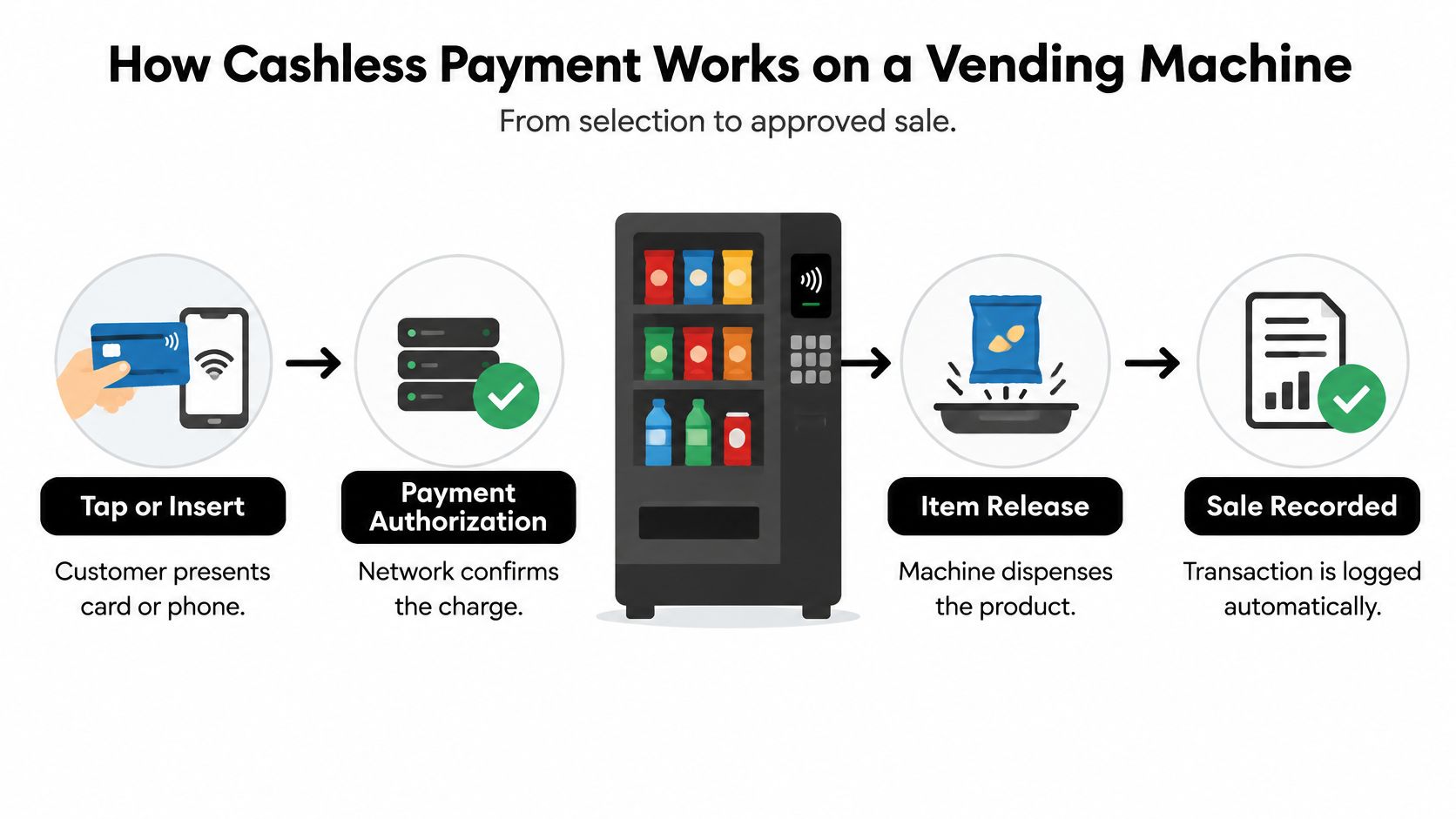
Select and present payment: The customer follows the machine's prompts and taps a supported card or phone, or inserts a card where supported.
Authorize the purchase: The payment system checks whether the transaction can proceed.
Release the item: After approval, the machine dispenses the selected product.
Record the sale: The connected system logs the transaction for operational review.
Phone use is substantial, but it isn't a substitute for card acceptance. Mobile phones represented 23% of all U.S. payments in 2024, including 11% of in-person non-bill payments and 45% of remote payments; adults ages 18–24 used phones for 45% of their payments, while consumers averaged 11 mobile-phone payments, compared with 10 in 2023 and 4 in 2018, according to the Federal Reserve's consumer payment diary.
Why the connection still matters
NFC, or near-field communication, lets a compatible card or phone communicate with the reader. Low-value transactions may qualify for offline approval under configured rules, while transactions above applicable limits or requiring an online PIN need connectivity, as explained in Adyen's cardholder verification documentation.
Offline acceptance isn't something to assume. Ask the operator what the installed reader and processor support, where the reader will sit, and what customers should do if authorization fails.
For broader payment-workflow context, Samba's tour payment features provide a resource from another operating setting, not a vending compatibility checklist. For machine-specific context, review how smart vending machines work and ask the operator to demonstrate an approved purchase, a decline, and a connection failure.
Operational and Financial Gains from Cashless Sales
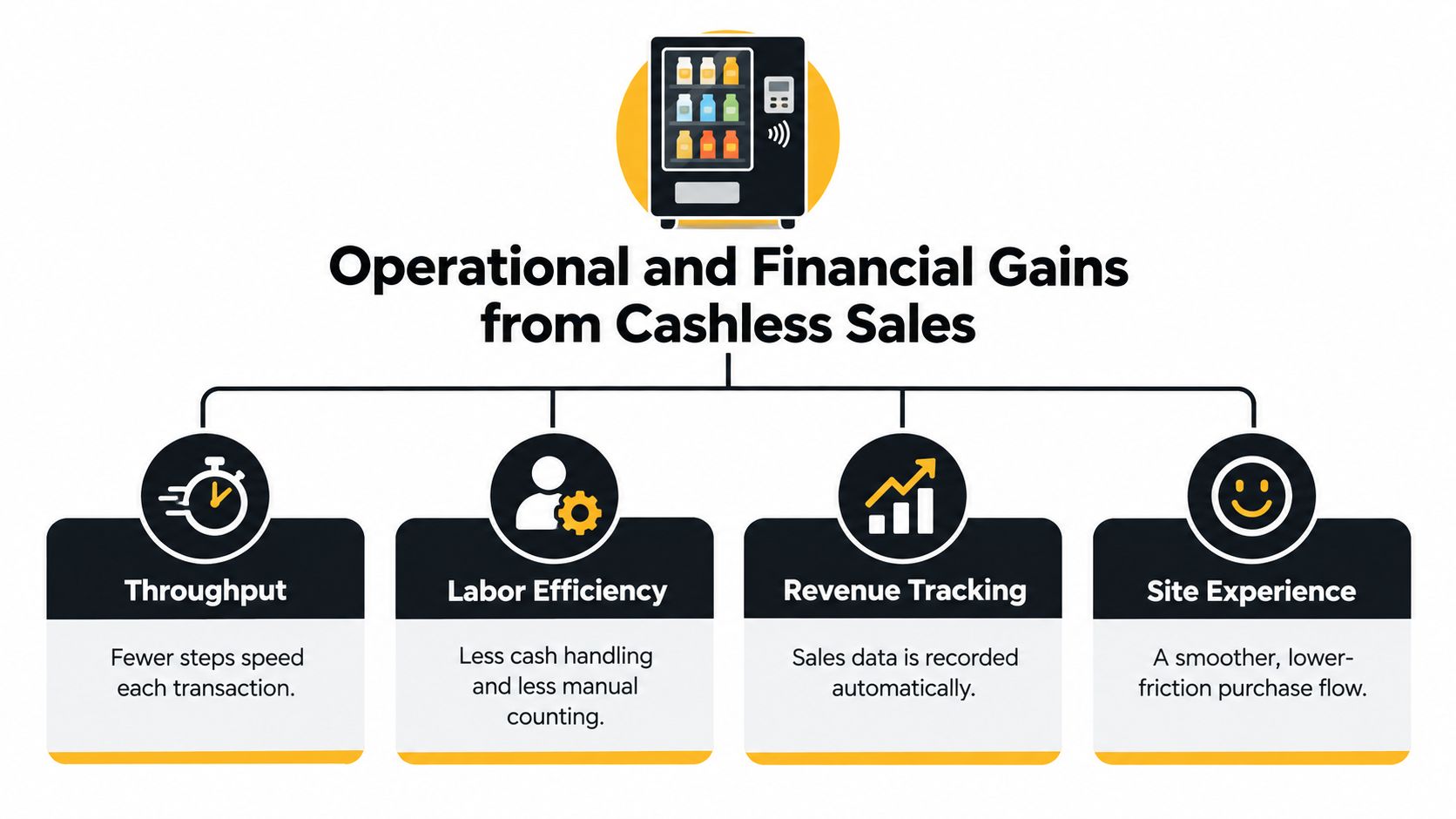
An operator should be able to explain a cashless program without relying on vague claims. The useful discussion separates checkout performance, cash-handling exposure, shared-surface contact, and sales visibility.
Those outcomes involve different work and need different measurements. A reader that accepts payments successfully doesn't, by itself, prove that the overall vending program is performing well.
Throughput and cash-handling work
The first potential gain is fewer payment steps. A Federal Reserve analysis of cashless businesses describes faster transactions, shorter waits, reduced reconciliation, and lower cash-processing exposure, including at Mercedes-Benz Stadium; it also reports that approximately 67% of surveyed respondents ranked contactless among the fastest payment methods, although about one-third still perceived it as slow.
That difference in perception matters. Measure the time from payment initiation to approval, and note customers who walk away before completing a purchase. Don't judge checkout speed from a successful demonstration during a quiet afternoon.
Cash-handling work is a separate issue. A cashless-only machine has no cash takings to collect or change float to replenish; a hybrid machine still requires that work for its cash sales. Ask who performs collection, counting, reconciliation, and exception handling before treating reduced handling as a saving.
The operational relationships are summarized below.
Shared surfaces and better stock decisions
Contactless payment also removes the need to exchange bills and coins during that purchase. In a shared break room or clinical workplace, that's a narrower and more defensible claim than saying cashless vending prevents illness. Customers may still touch selection buttons, the retrieval flap, and the product.
Sales visibility offers another operational use. When transactions are connected to machine, item, and time, an operator can compare demand across locations and investigate recurring stockouts. A transaction data analysis approach should lead to replenishment decisions, not a dashboard nobody checks.
For payment-system comparison questions, PlatformDTC's guide to DTC payments for operators is an additional resource. Confirm vending-specific capabilities directly with the proposed processor.
A payment record is useful only if someone reconciles it, investigates exceptions, and acts on what customers are buying.
Secure processing remains necessary. The Federal Reserve's payment risk-officer survey identifies debit cards among payment types associated with fraud attempts and losses, so cashless shouldn't be described as fraud-free.
Require reputable processing, tokenized credentials, updated terminal software, and unusual-activity monitoring. Then track vend speed, cash-handling labor, stockouts, and sales by location as distinct operating measures.
Cashless Vending Across Workplaces and Public Sites
The same payment reader can serve very different needs depending on where it's installed. Start with the situation in the room, not a standard equipment package.
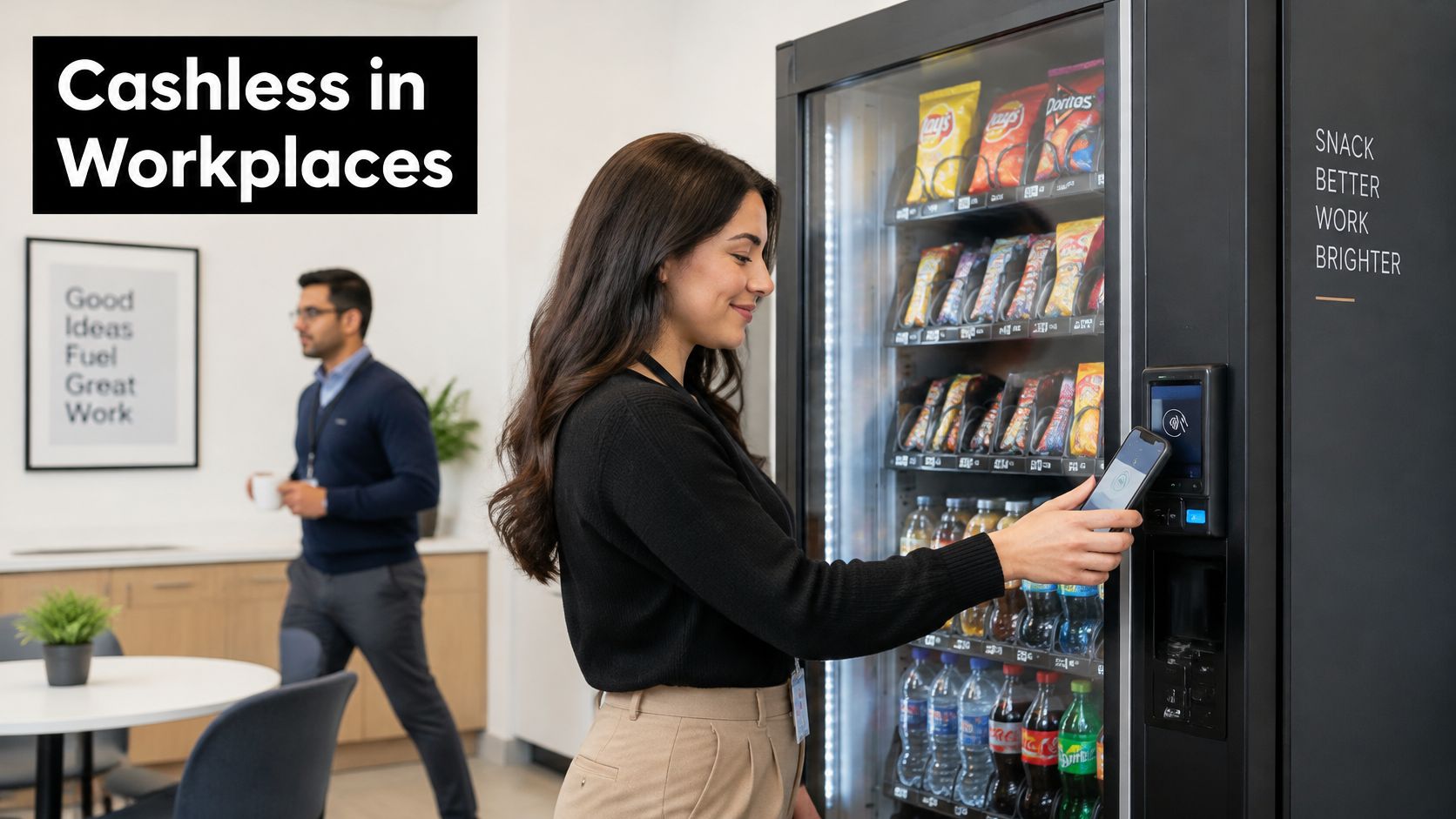
In an office, the intended interaction may be as simple as an employee buying a drink before returning to a meeting.
Offices and campuses have different rhythms
In a corporate office or business center, a useful goal is completing the purchase within the employee's available break. Product feedback matters too: employees may want different drinks or snacks than the original assortment provides. The payment system supports the purchase, while the operator remains responsible for keeping relevant products available.
On a school or college campus, assess movement between classes and the mix of students, staff, and visitors using each building. The younger-adult mobile-payment pattern described earlier makes wallet acceptance relevant, but it doesn't justify removing physical-card access or ignoring students who need cash.
Office priority: Place payment instructions where a first-time user can understand them without asking reception.
Campus priority: Check access for the full building population, not just confident phone-wallet users.
Business-center priority: Make the purchase understandable for visitors who don't know the property.
Clinical, industrial, and public settings
In hospitals and clinics, staff may need refreshments during long shifts, while visitors may arrive without planning a purchase. Contactless acceptance can avoid cash exchange and coin handling, but it shouldn't be presented as a clinical intervention. Readable prompts, reachable controls, and clear support information deserve attention.
At a manufacturing plant, observe the shift-change rush. If employees gather at a single machine, evaluate the whole purchase sequence, including selection and product retrieval, rather than focusing only on the tap.
For another view of the vending setting, consider the footage below.
Airports, stadiums, and public facilities need a capacity assessment. A working reader won't solve a machine that runs out of popular products during a rush, and a strong connection during installation doesn't establish performance during the busiest operating period.
Multi-tenant housing presents a different question: can residents and guests use the shared refreshment area comfortably without assistance from an employer's office team? When evaluating vending machines in different locations, choose a primary goal for each site, such as convenient access, reduced cash contact, or better assortment decisions. Don't assume every location needs identical equipment or payment rules.
Who Still Needs a Cash Option
Cashless acceptance and cashless-only service aren't the same decision. Adding a card reader gives customers another way to pay. Removing cash can take an existing option away.
The distinction matters for someone without a bank account, a visitor unfamiliar with digital wallets, or a customer whose available payment method doesn't work at that machine. Don't assume a smartphone is required for every cashless purchase, either: a supported physical card can work without a phone.
Adoption doesn't mean universal access
The OECD's assessment of access to cash reports that two-thirds of adults worldwide used digital payments in 2022, yet 45% of people with low digital literacy, 36% of people with disabilities, and 35% of people experiencing financial difficulties said they couldn't do without cash; it also identifies approximately 13.5 million unbanked people in the eurozone and reports that digital-payment participation in developing economies rose from 55% in 2021 to 62% in 2024.
These findings describe different populations, not a forecast of who uses your break room. They support a practical question: who at this location would lose purchasing access if cash disappeared?
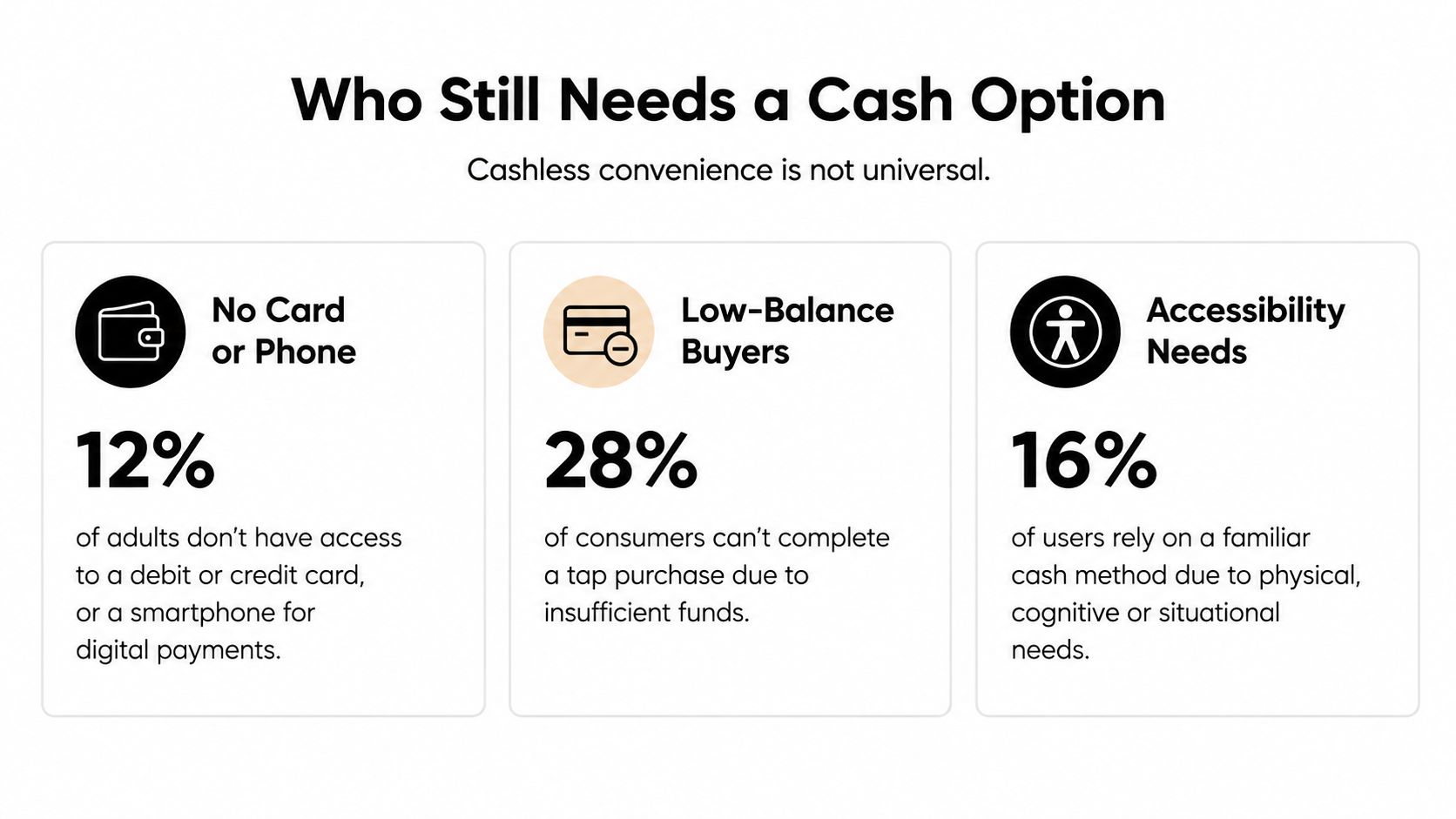
For access decisions, use the cited OECD findings and direct site feedback rather than treating an illustration as a local customer survey.
Design for the person who can't tap
A facilities manager doesn't need to choose between modern payments and thoughtful access. A hybrid machine or another clearly communicated cash purchasing option may fit the population better than a blanket cashless-only rule.
Show accepted methods: Use plain signs naming supported cards and wallets before customers begin.
Check physical usability: Review screen readability, reader position, reach, and instructions with actual users.
Keep an appropriate alternative: Consider cash acceptance where customers depend on it.
Review unsuccessful attempts: Separate access complaints from ordinary declines and machine faults.
Access test: Can someone who arrives with only bills still obtain a drink or meal through a clearly explained route?
Digital payment participation can grow while individual customers remain excluded. The defensible choice is a payment design based on the people using the site, supported by assistance and monitoring, rather than an assumption that everyone can adapt.
How to Choose a Cashless Vending Partner
Ask an operator a direct question: What happens when this machine can't connect? The answer should identify who receives the alert, what the customer sees, and who restores service.
The Swiss National Bank's 2025 company payment survey found that about 40% of companies experienced a technical disruption annually when accepting cashless payments, with terminal failures accounting for 42% of reported failures and internet problems for 29%; companies often viewed cash as cheaper, and 74% of dissatisfied businesses cited high costs as their main concern.
Those findings aren't a prediction for an Oklahoma vending site. They're a reason to compare full operating arrangements instead of assuming digital acceptance is always cheaper.
What to Compare Before Going Cashless
Criterion | Cash-only | Cashless-only | Managed or hybrid program |
|---|---|---|---|
Fees | Review collection and banking costs | Review processing and platform fees | Confirm all included and additional charges |
Equipment | Maintain validators and change mechanisms | Maintain readers and payment software | Identify responsibility for each component |
Connectivity | Cash acceptance avoids online authorization | Confirm network and offline capabilities | Establish supported fallback arrangements |
Support | Define cash-jam and refund procedures | Define reader and network fault response | Assign a single escalation contact |
Chargebacks | No card-payment disputes | Confirm dispute handling and liability | Put responsibilities in the agreement |
Service and data value | Compare collection work with reporting needs | Evaluate usable transaction reporting | Verify who acts on reports and feedback |
Compare the service behind the reader
Include installation, equipment, connectivity, support, processing, and dispute administration in the lifecycle-cost discussion. Ask whether reports distinguish an issuer decline from a disconnected terminal, and whether customers receive a clear error rather than an unexplained failed purchase.
A vending service-level agreement should define reporting, escalation, replenishment responsibilities, and repair expectations. “We monitor the machines” isn't enough unless someone explains what monitoring triggers.
A local option is Vendmoore, which installs and operates smart vending machines across the Oklahoma City metro, including Norman, Edmond, and nearby cities. Its offering includes Apple Pay and Google Wallet, connected inventory and performance telemetry, and assortments adjusted using customer feedback.
Equipment choices include compact refreshment centers, bottle-and-can vendors, dual-zone chill centers, and frozen machines. Clients can consider a fully managed program or machine ownership, but should compare those arrangements with other operators against the same access, cost, and service criteria.
Choose the program whose responsibilities are clear, not the machine with the longest feature list.
Put Cashless Payment to Work at Your Location
Start with a single location and observe how people use it. Choose the break room, lobby, shared residential area, or staff refreshment space where complaints or purchasing difficulties are easiest to investigate.
Talk with users as well as the person responsible for the vending contract. A manager may hear about empty shelves, while employees can explain that a particular card repeatedly fails or that the payment instructions are confusing.
Prepare a useful site check
Bring a short set of observations to the operator conversation.
Identify the users: Include employees, students, patients, residents, contractors, and visitors where relevant.
Ask about payment habits: Find out whether people prefer phones, physical cards, cash, or a combination.
Observe the queue: Note peak periods and where customers hesitate during a purchase.
Review existing work: Ask who handles cash, refunds, and payment complaints.
Check availability: Record recurring sold-out items and requests for different products.
Look for access gaps: Identify anyone who would be unable to buy if cash were removed.
These observations give an operator something concrete to assess. They also help you distinguish a payment problem from a placement, assortment, or servicing problem before choosing equipment.
Turn observations into a service conversation
For workplaces, schools, clinics, manufacturing plants, housing communities, and public venues in central Oklahoma, review the available vending services and ask about both managed and owned-machine arrangements. Bring your site notes, expected users, product needs, and access concerns rather than requesting a reader in isolation.
Ask the proposed operator to explain how the setup addresses those conditions and who will review performance after installation. The practical outcome is a payment mix that lets more people finish a purchase, keeps wanted products available, and preserves a usable path for customers who can't tap.
Vendmoore Enterprises offers smart vending installations, cashless payment acceptance, and inventory-informed service for break rooms and shared spaces across the Oklahoma City metro. Visit Vendmoore Enterprises to discuss a managed program or machine ownership, bringing your location's payment, stocking, and access needs into the conversation.
Comments