_edited.png)
Fix Vending Machine Problems the Safe Way

You're in the break room, someone's tap payment appears to have cleared, and the snack is still hanging behind the glass. A coworker suggests unplugging the machine. Another wants to shake it. Neither move tells you whether the problem started at the reader, the controller, or the spiral.
The useful first move is naming the symptom, not grabbing a screwdriver. You can often narrow the fault without opening a panel, and you can give the vending operator a much better service report while keeping customers away from a machine that might take another payment.
Match the Symptom Before You Open Anything
A vending machine combines several systems inside the same cabinet. The payment reader can be working while a selection motor fails. The display can stay lit while refrigeration stops. Treating every complaint as a broken machine makes it easy to replace the wrong part.
To fix vending machine problems safely, match what you can observe to the appropriate check. Start with the display, payment message, selection number, and delivery bin. Don't assume that an illuminated card reader proves the rest of the cabinet has power.
Choose the matching symptom
Vending symptoms and the first safe check
Symptom | Likely cause | Safe first check | Stop and call when |
|---|---|---|---|
Display dark or machine dead | Outlet, GFCI, or breaker | Confirm power at the wall and reset a tripped GFCI once | Breaker trips again or wiring is exposed |
One selection stuck, others vend | Product bridge, bent spiral, or that motor | Look through the delivery door and test a known-good selection | Coil won't turn or product is crushed in the mechanism |
Payment accepted, nothing drops, cash and card both fail | Controller, power supply, or MDB wiring | Note if the motor ran and if a drop was sensed | Motor never runs and the code won't clear |
Cash works, card or wallet fails | Reader, cable, antenna, or network | Try cash, then one card, and check for an offline message | Reader stays offline after one restart |
Coins or bills rejected | Coin mechanism jam or bill validator | Clear the coin path and try one clean bill or coin | Validator still rejects clean bills after cleaning |
Drinks or snacks warm | Airflow, setpoint, door switch, or refrigeration start | Check setpoint, wall gap, and condenser screen | Compressor never starts or there's a refrigerant smell |
Error returns after every reset | Stored self-diagnostic | Record the code before resetting | Same code remains after the matching check |
The table separates likely causes, not confirmed diagnoses. A bag stretched across adjacent spirals can look like a failed motor. A reader showing an offline message can look powered and healthy while it can't complete a transaction.
For coin-path cleaning, service-menu access, or any other internal task, the safe-check column assumes an authorized person following the machine's manual. It isn't permission for a customer to open the cabinet, reach behind a guard, or touch wiring.
Set a boundary before opening a door
Write down the exact error code, including letters and punctuation. Choose the matching row, then keep locked cabinets and sealed refrigeration closed unless an authorized service procedure requires access.
Practical rule: Looking through the glass is observation. Reaching into a mechanism is service work.
For facilities teams deciding where that boundary belongs, Safety Space's guide to understanding workplace machine guarding requirements provides useful context for keeping people separated from moving equipment. Don't defeat a delivery flap or protective cover to retrieve a purchase.
Machine capabilities also affect what you should expect to see. Familiarity with vending-machine features, including payment interfaces and monitoring functions, helps you describe the fault accurately rather than reporting every interruption as a total shutdown.
How to Run a Safe First Check
Use a controlled test, not a series of guesses. Keep customers from starting transactions while an authorized staff member checks the machine, and stop immediately if there's damaged wiring, water around electrical equipment, or a burning smell.
The VMFS USA troubleshooting guide supports diagnosing the transaction path in order: power, service diagnostics, separate payment methods, selections, mechanical obstructions, and then qualified electrical testing. That sequence preserves evidence and separates faults that happen to produce the same complaint.
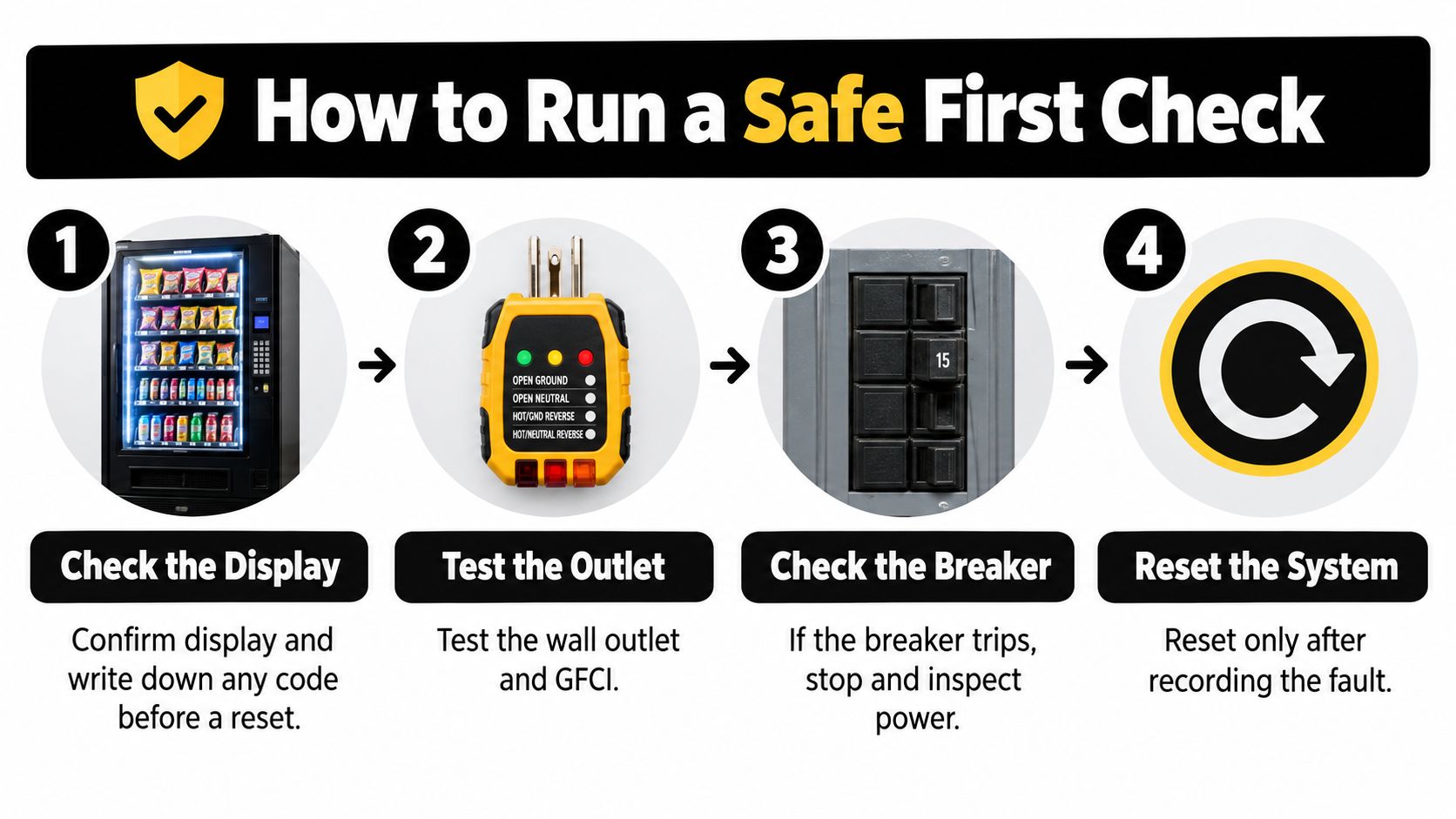
Work through the customer-accessible checks
Confirm the display and capture the code. Check whether the main display is active, not just whether the reader has lights. Photograph the error message before anyone resets power. A restart may remove the visible message without removing the underlying fault.
Check the wall supply safely. An authorized facilities employee can use a suitable plug-in outlet tester to check an accessible, dry receptacle. Check the GFCI and the site's breaker information without removing covers. If the breaker trips a second time, stop rather than continuing to energize a possible fault.
Use the service menu only with permission. If the site authorizes access, review stored faults before changing settings. Test cash and cashless payment separately, using the operator's approved test procedure. This distinguishes a payment peripheral problem from a machine-wide failure without changing unrelated settings.
Test the affected selection, then a known-good selection. Record which selection you used and whether its motor moved. If the neighboring selection works, focus on the failed position before blaming payment processing. If several selections fail, the technician has reason to investigate shared components.
Look for a mechanical obstruction. Inspect the delivery bin and the visible product path with a flashlight. A wide snack bag can bridge across a divider, and a package can catch beneath the next spiral turn. Don't force the coil by hand, push tools through the delivery opening, or shake the cabinet.
Allow the restart sequence to finish. If the machine has just been powered on, don't judge it while its controls are still initializing. On refrigerated equipment, allow up to three minutes before judging a refrigeration restart; that delay concerns the cooling module, not permission to repeat unsuccessful purchases.
Hand electrical measurements to a qualified technician. Connector, motor, sensor, and controller-output tests require the correct meter, wiring information, and safe access procedure. Electrical work behind panels and board-level repairs aren't facilities-manager first checks.
Interpret the result without replacing parts
A single failed selection is a local mechanical or motor problem until testing gives you evidence otherwise. A single failed tender points toward that payment peripheral until other payment methods fail too. These are starting hypotheses, not reasons to order parts immediately.
Say a chip bag remains wedged across its divider while the next selection vends normally. Replacing the card reader won't free the bag. Likewise, replacing a motor before removing the obstruction can leave the replacement struggling against the same load.
Record what changed during the test. A machine that worked after an obstruction was cleared tells a different story from one that worked only after power was interrupted.
Common misses include resetting without recording the code, swapping a motor while packaging is still trapped, and treating a single-coil fault as a payment outage. Avoid changing several things together, because you won't know which action corrected the symptom.
Finish the ticket with the first symptom, exact code, tests performed, corrective action, and whether the next vend succeeded. Include any diagnostic measurements taken by the technician. That record lets the operator evaluate completed repairs by machine model and fault category instead of counting a powered-on display as a successful visit.
Cool a Warm Machine Without Opening the System
A combination snack-and-drink machine can accept payment and turn its spirals while serving warm drinks. Start with airflow and configuration rather than assuming the compressor needs replacement.
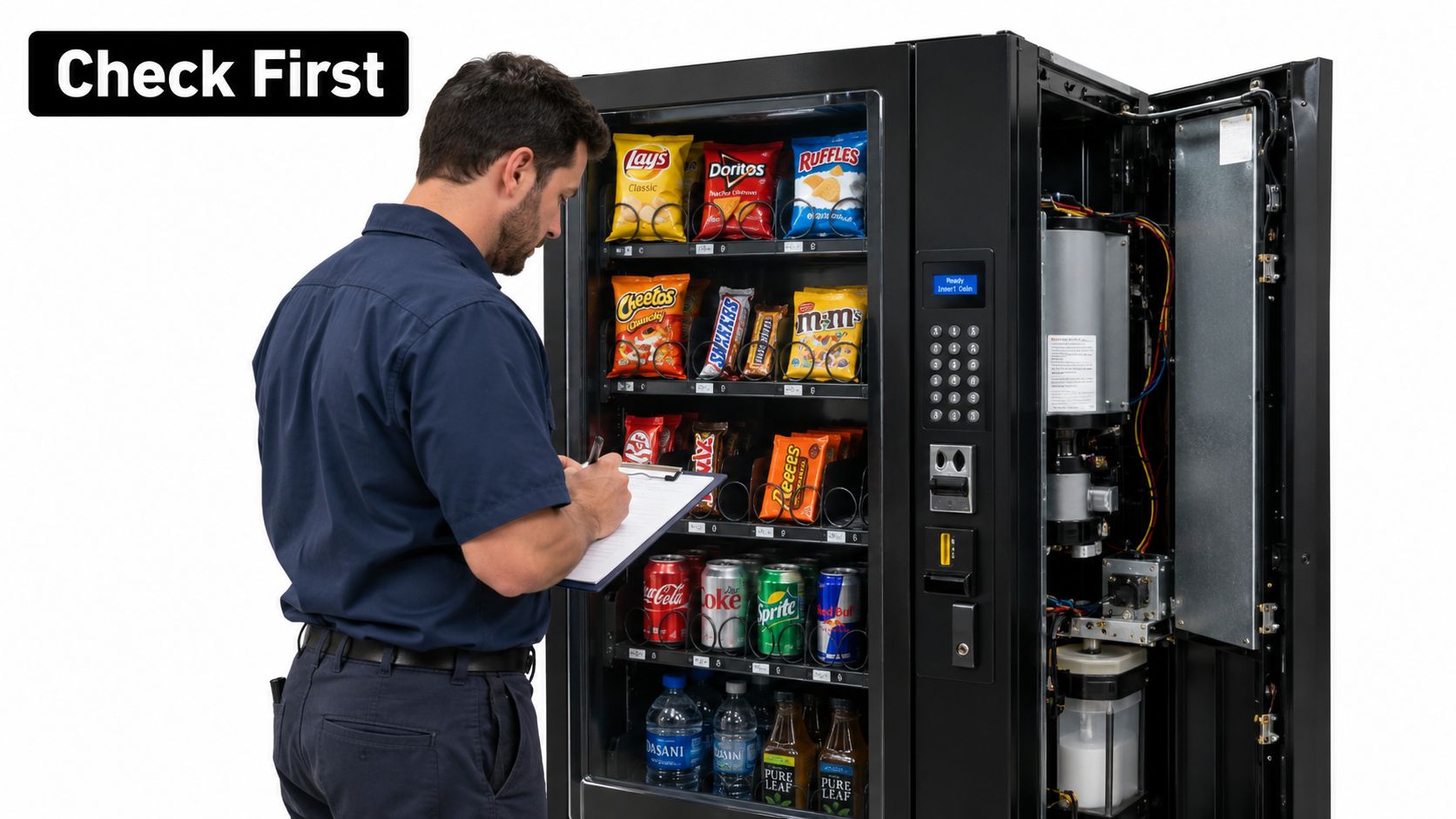
Isolate the cooling fault
Save the fault. An authorized person should enter service mode and record stored errors before changing anything.
Verify the setpoint. Check that the setting suits the products being stocked. Don't lower it blindly to compensate for poor cooling.
Restore airflow. Confirm the manufacturer's wall clearance, then clean the condenser screen and rear or bottom vents with power isolated as the manual directs.
Inspect accessible components. Authorized service staff should check the door switch and harness for pinching or damage.
Check module starting. A qualified technician can temporarily supply the module from a known-good outlet. The AMS refrigeration troubleshooting document allows up to three minutes for restart delay and specifies checking 24 VDC control voltage, relay output, and 120 VAC at the refrigeration receptacle.
Leave measurements to trained personnel. Test the harness and controller connection before condemning the board.
This order separates airflow, configuration, control, relay, harness, and supply faults. Refrigerant recovery, evacuation, charging, and compressor replacement require qualified personnel and proper tools.
Record the model, code, measured voltages, ambient temperature, product temperature, and restart time. Consistent machine health monitoring helps distinguish a recurring cooling problem from an isolated interruption.
Payment Taken but Nothing Dispensed
Reduce the complaint to three yes-or-no facts: was payment authorized, did the vend motor run, and did the delivery sensor confirm a drop? If you can't verify an answer, record it as unknown rather than guessing from a sound or a banking notification.
The Neuroshop vending troubleshooting guide distinguishes authorization, motor operation, and drop confirmation because each points to a different part of the transaction. A reader that never authorizes payment isn't the same fault as a controller that accepts authorization but never starts the motor.
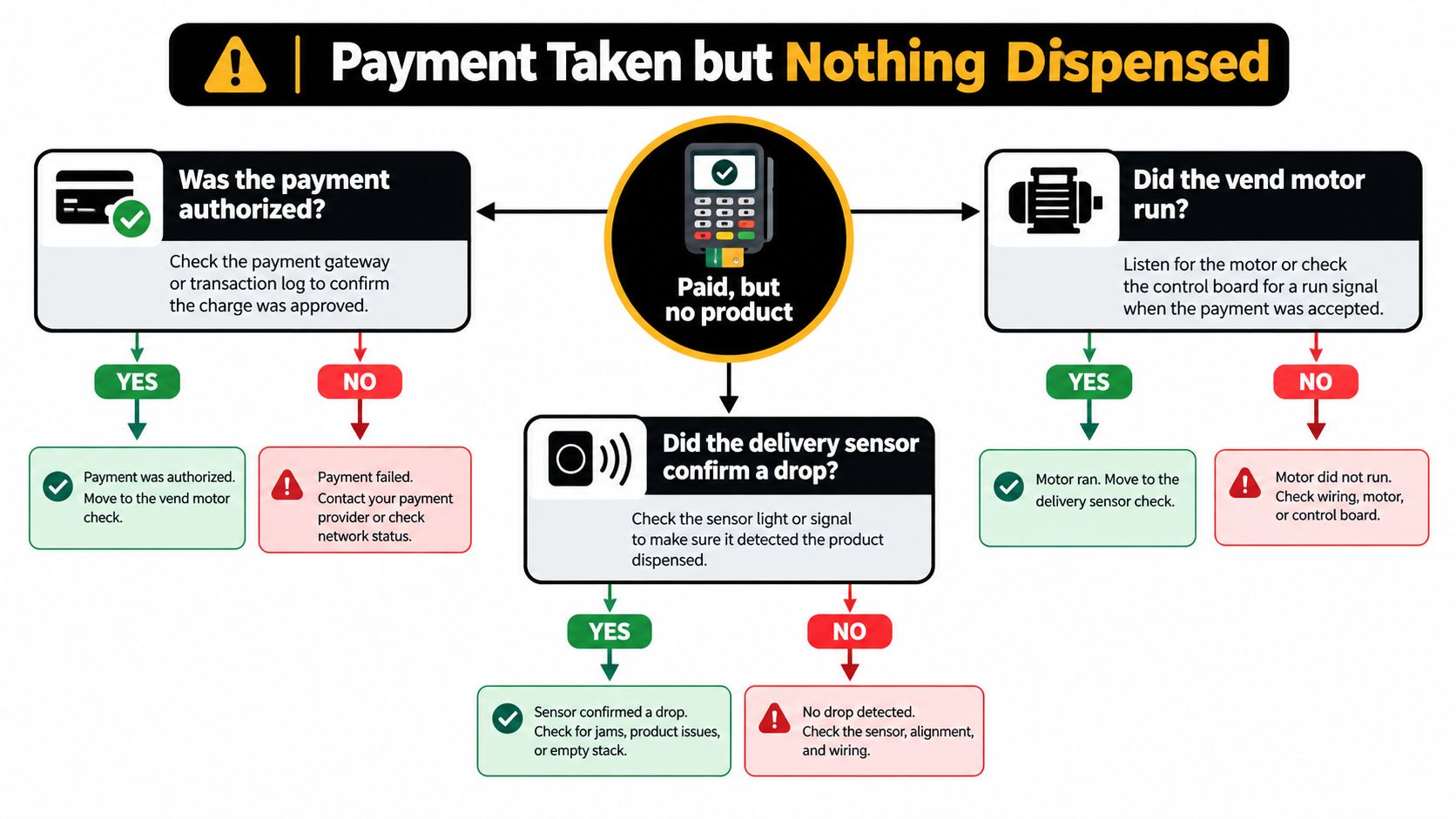
Read the transaction rather than the bank app alone
Payment outcomes and likely causes
Authorized | Motor ran | Drop sensed | Likely cause | Next step |
|---|---|---|---|---|
Yes | No | No | Controller, power, or MDB wiring | Stop, record time and selection, and don't reset repeatedly |
Yes | Yes | No | Jammed bag or crooked spiral, or drop sensor | Check the delivery bin and sensor, then run a jam check |
Yes | Yes | Yes | No vend failure indicated | Check the bin for the product; no refund needed if it's present |
No (card or wallet) | No | No | Card reader, cable, antenna, or network | Try cash, then restart once and record the result |
Unknown | No | No | Unclear sale path | Post an out-of-service note and record the transaction status |
Drop confirmation is usually something an authorized operator verifies through diagnostics, not something a customer can reliably infer. A sensor record also isn't proof that the customer received the correct item. If the bin is empty despite a recorded drop, preserve that discrepancy for the operator instead of dismissing the complaint.
When cash and card both authorize but nothing moves, shared controller power or MDB wiring deserves attention. MDB is the communication connection between the controller and payment peripherals. When cash produces a successful vend but the card or wallet doesn't, investigate the reader and its communication path.
A hospital's interior walls or a plant's structure can weaken cellular reception even when employees' computers work normally. Other possibilities include a building-network interruption, payment-provider disruption, damaged antenna, or loose cable. Understanding the cashless payment system helps identify which connection the reader uses.
Preserve refund evidence and limit further sales
Save the transaction time, machine location, selection number, amount, and exact on-screen status. Photograph the machine identifier and display if doing so won't capture another person's payment details. Don't send a full card number or wallet credentials with a service request.
A pending bank entry isn't enough to establish the final transaction outcome. Give the operator the machine's message and let them reconcile it with the payment record. Don't promise that every authorization will settle or that every failed vend will reverse automatically.
After recording the code, limit an authorized safe restart to a single power cycle. If the motor ran without drop confirmation, investigate a jam or sensor issue instead of assuming the bank caused the failure. Never open a locked or refrigerated cabinet to fish out a product.
Customer-facing note: Payment outcome unclear. Please don't retry this selection. Contact the listed operator with the time, amount, and selection number.
If the sale path remains uncertain, leave a clear out-of-service notice. The next customer shouldn't have to pay again to confirm the same fault.
Keep the Aisle Clear While You Fix It
In a hospital corridor or school lounge, the repair area is part of the job. A working motor doesn't help someone who can no longer reach the payment reader.
The ADA accessibility standards require at least one of each provided vending-machine type to meet accessibility requirements, with accessible routes at least three feet wide and unblocked.
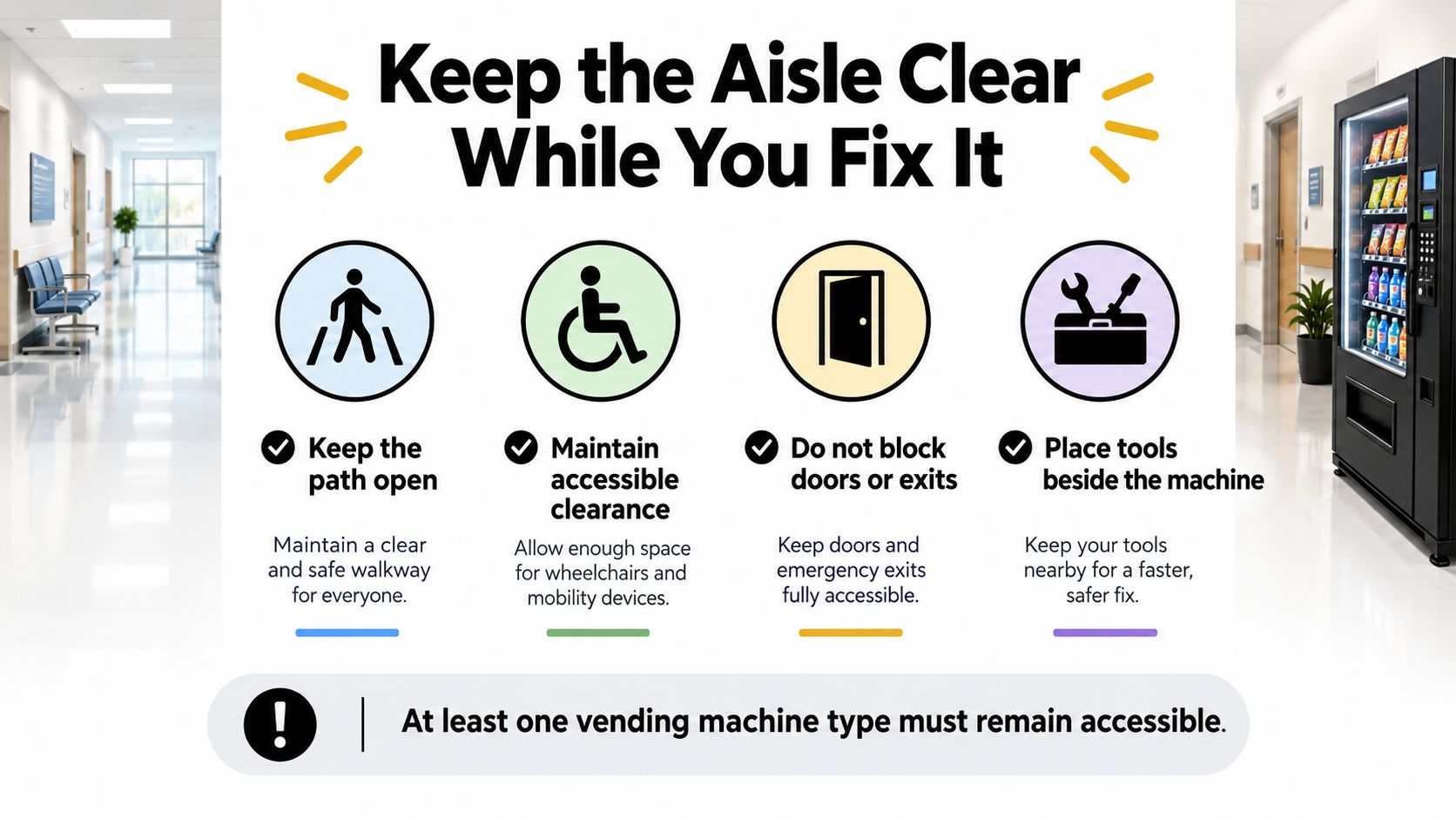
Protect access during service
Limit cabinet movement. Trained personnel should move it only as far as necessary, preserving the route and returning it to its operating position before leaving.
Keep controls reachable. Don't stack cases in front of the selection panel or reader. Disabling the only usable payment interface can make an otherwise working machine inaccessible.
Explain downtime. Post an out-of-service notice and identify an alternative machine when available. An isolated maintenance interruption isn't automatically prohibited, but it doesn't justify leaving a dead cabinet obstructing a narrow hall.
Secure the work area. Address sharp edges, exposed wiring, and suspected refrigerant leaks. Keep tools beside the cabinet, away from doors and exits, and never leave its service door unlatched in public.
Verify usable operation. Test a cash sale and a cashless sale after service, then remove packaging, tools, and notices only when appropriate.
A repair is finished when a real vend works and the route in front of the machine is open again.
Preventive Maintenance That Cuts Repeat Calls
Use restocking as an inspection opportunity. A leaning package, clogged screen, or strained reader cable is easier to address before customers report a failure.
Build inspection into the restock
Clean the airflow path. Vacuum the condenser screen and rear or bottom vents using the machine's safe cleaning procedure. Don't bend fins or push debris deeper into the assembly.
Check cabinet spacing. Confirm that cleaning crews or nearby furniture haven't pushed the machine against the wall.
Watch the product fit. Match packages to the spiral and divider spacing. Bags should advance freely rather than pinch against neighboring stock.
Inspect communication cables. Authorized staff should check that antenna and reader cables are seated, protected, and free of strain without disturbing energized components.
Prove cashless operation. Complete an approved test sale after service, rather than assuming reader lights mean transactions work.
Keep a usable log. Record fault codes, affected selections, maintenance actions, and test outcomes under the machine's identifier.
For facilities teams responsible for the building supply, Lighthouse Energy Services' guidance on how to prevent costly electrical downtime adds useful context beyond the vending cabinet. Outlet and circuit problems need building-level attention, not repeated machine resets.
A useful maintenance entry says what was inspected and what passed. “Checked machine” doesn't help the next technician.
Assign routine tasks through preventive maintenance scheduling, with a named owner and completion record. Preventive work reduces avoidable interruptions, but it doesn't make electrical faults or sealed-system work suitable for untrained staff.
Call a Technician Before the Next Reset
Stop troubleshooting when the next action would expose someone to electrical, mechanical, or refrigeration hazards. A persistent fault needs a diagnosis, not another attempt to make the display look normal.
Recognize the stop conditions
Repeated protective trips. Stop when a breaker or GFCI trips twice. Don't bypass the protection or move the machine to another circuit to keep it running.
Exposed wiring or damaged electrical parts. Keep people away and have qualified personnel isolate the equipment safely.
Suspected refrigerant odor or leakage. Don't search for the leak by opening tubing or disturbing the compressor assembly.
A persistent stored code. Escalate when the same code survives the matching check.
Authorization without motor operation. Stop accepting test payments when the machine authorizes a sale but never starts the vend motor.
Cash rejection after basic care. If the authorized coin-path check is complete and a clean bill is still rejected on another attempt, arrange service. A cash-only symptom can involve wiring or controller communication, not just dirt.
Work beyond site competence. Opening a sealed refrigeration system or metering boards without training is a firm handoff point.
Before arranging outside work, review the applicable vending-machine warranty. Keep the machine identifier and prior service record available so the technician can establish coverage and avoid undocumented modifications.
Make the handoff useful
For an office, school, clinic, industrial plant, or apartment community that doesn't want facilities staff managing cabinet downtime, we offer full-service vending at Vendmoore Enterprises, handling stocking, service, and support. That gives the site a clear handoff instead of leaving employees to coordinate unrelated checks.
When you call, have the machine's exact location, initial symptom, error code, and whether cash still works ready. Add the affected selection, transaction status, and anything the authorized test changed. If the machine is in a secured building, explain the access arrangements without assuming the technician can enter unescorted.
For organizations coordinating service across several properties, SIX ERP's explanation of how ERP connects field services offers context for organizing work orders, equipment records, and technician updates. The practical point is straightforward: keep the complaint, diagnosis, and completed test attached to the same machine record.
Contact the local team
Call us at 405-294-2373. Our office is open Monday to Friday, 9:00 AM to 5:00 PM. Office hours aren't a promise of a particular repair arrival time, so describe any immediate safety concern clearly when you contact us.
Our listed service area covers Oklahoma City, including all OKC metro locations, Moore, Choctaw, Del City, Jones, Norman, Mustang, Edmond, Newcastle, Shawnee, and Tuttle. Whether the cabinet sits in a teacher lounge, workplace break room, or community space, the useful outcome is the same: a verified vend, a secure cabinet, and an open aisle.
Vendmoore Enterprises offers fully managed break room vending with stocking, service, and support, so your facilities team doesn't have to own every machine interruption. Visit Vendmoore Enterprises to discuss vending for your Oklahoma location and a practical plan for keeping refreshments available.
Comments