
How to Pay Cashless at Vending Machines: Step by Step

You're standing in a break room with two minutes before your next meeting, no coins in your pocket, and a screen flashing at you from the vending machine. Someone's waiting behind you. You tap your phone, nothing happens, so you tap again. Then the worry hits. Did it charge you twice, once, or not at all?
That's why learning how to pay cashless matters less as a tap trick and more as a sequence. A vending purchase has three parts: authorization, product release, and settlement. Once you know which part you're in, you know whether to wait, walk away, or call for help.
Payment Methods at a Vending Machine Compared
Most cashless vending machines accept a phone tap, a contactless card tap, and sometimes a chip card or cash, depending on the model.
Read the front panel first. Look for the contactless symbol, a set of curved waves near the reader, and the list of accepted methods near the selection buttons. That list tells you more than any guess, because two machines that look identical can run different payment setups.
Payment methods at a cashless vending machine
Method | What You Need | How to Pay | Best For |
|---|---|---|---|
Apple Pay | iPhone with a card in Wallet and Face ID or Touch ID set up | Hold the phone near the contactless symbol and confirm when asked | Fast payment with no card handling |
Google Wallet | Android phone with NFC, a card added to Google Wallet and a screen lock | Unlock the phone, hold it near the symbol and confirm if prompted | Android users with a card saved in the wallet |
Contactless credit or debit card | Card with the contactless symbol | Tap the card on the reader and wait for the approved message | Anyone with a card and no app |
Chip card | Card with a chip, and a machine that accepts insertion | Insert the card and leave it in until the machine says to remove it | Machines without a tap reader |
Cash | Exact coins or bills the machine accepts | Insert bills or coins into the cash slot | Customers without a card or phone where cash is listed |
A tap is usually fastest because you finish with minimal interaction, no PIN pad fumbling and no change. That's now the normal pattern, not the exception. A 2025 vending payment report cited by Vending Times stated that 71% of vending machine transactions were cashless in 2024, and 77% of those cashless transactions were contactless. The same report said transactions made by phone or smartwatch increased 300% compared with the prior year.
Behind that tap, money doesn't move instantly to the operator in final form. Authorization comes first, settlement later, and the gap matters when something goes wrong. If you manage payments for a business and want that back end explained plainly, settlement and custody considerations for fintechs covers how funds are held and moved between parties.
Practical rule: Pick the method you already have ready. A card saved in your phone beats digging for a physical card while the screen times out.
I would start with whatever's already in your hand. If your phone wallet is set up, use it. If not, a contactless card is just as valid, and you won't lose your place in line setting up an app.
Set Up Your Wallet Before You Reach the Machine
Do one thing at home: add a bank card to your phone wallet before you ever walk up to a machine.
On an iPhone, open Wallet, tap the add option, and scan or type your card details. Confirm with your bank if it asks. On Android, open Google Wallet, choose add a payment card, and do the same. Our guide on using Google Wallet at a vending machine walks through that Android flow in more detail.
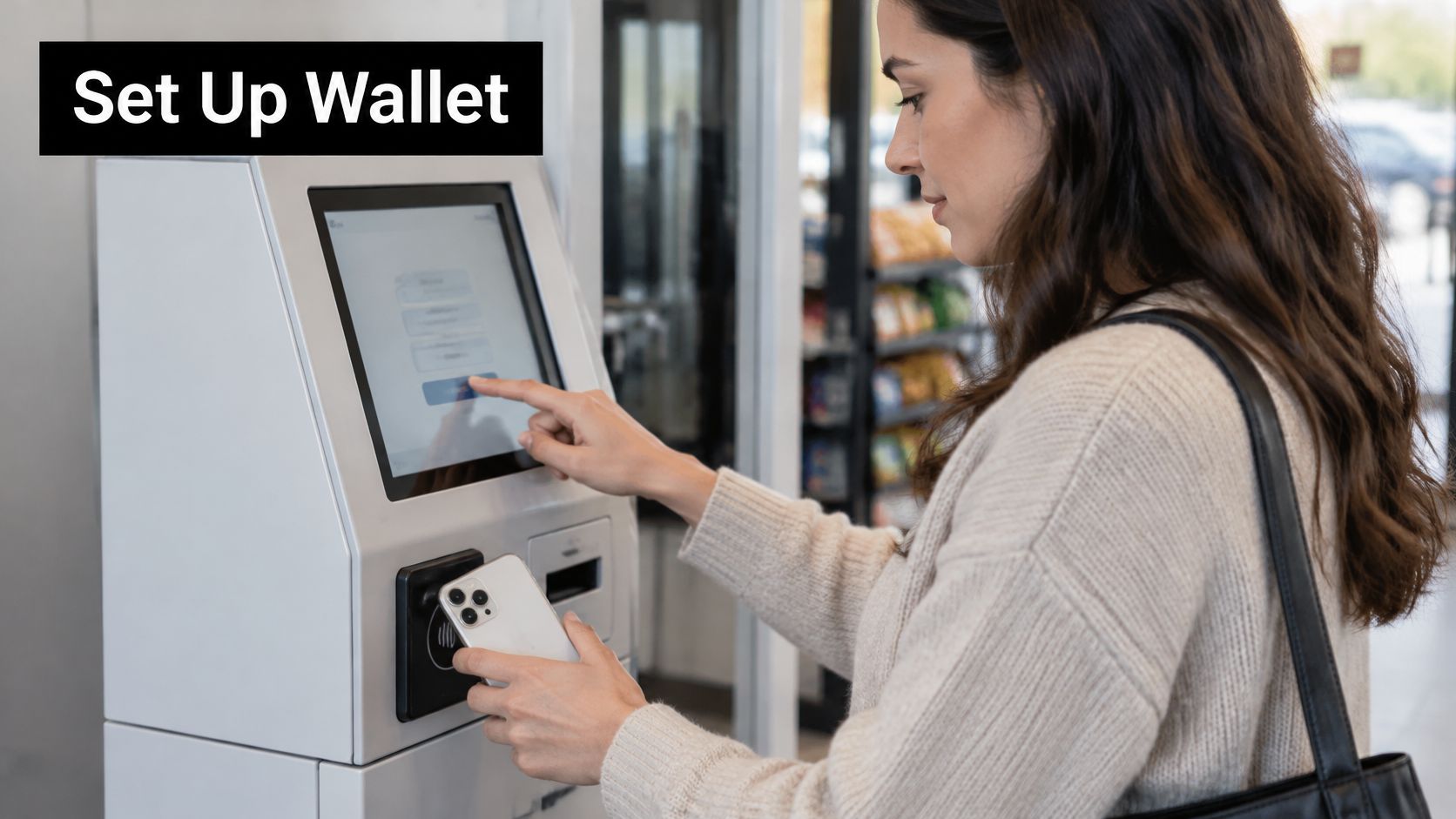
Here's a wallet tap at a self service terminal, which works the same way as a vending reader.
Next, turn on the lock your wallet requires. That's Face ID, Touch ID, or a passcode on iPhone, and a screen lock on Android. Check that the card shows as ready in the wallet app, not pending verification.
A few checks save you at the machine:
Turn on NFC: A phone with NFC switched off can't tap, no matter how close you hold it.
Keep a backup card: Add a second card in case your bank pauses contactless use on your default one.
Check your physical card: Look for the curved waves symbol so you know it works as a fallback.
Our machines accept credit and debit cards, Apple Pay, Google Wallet, and cash, with tap to pay and remote monitoring, so a ready wallet is enough. Once setup's done, the next purchase is just tap, hold, confirm.
How to Tap to Pay with Your Phone or Card
The graphic below shows the order most machines expect.
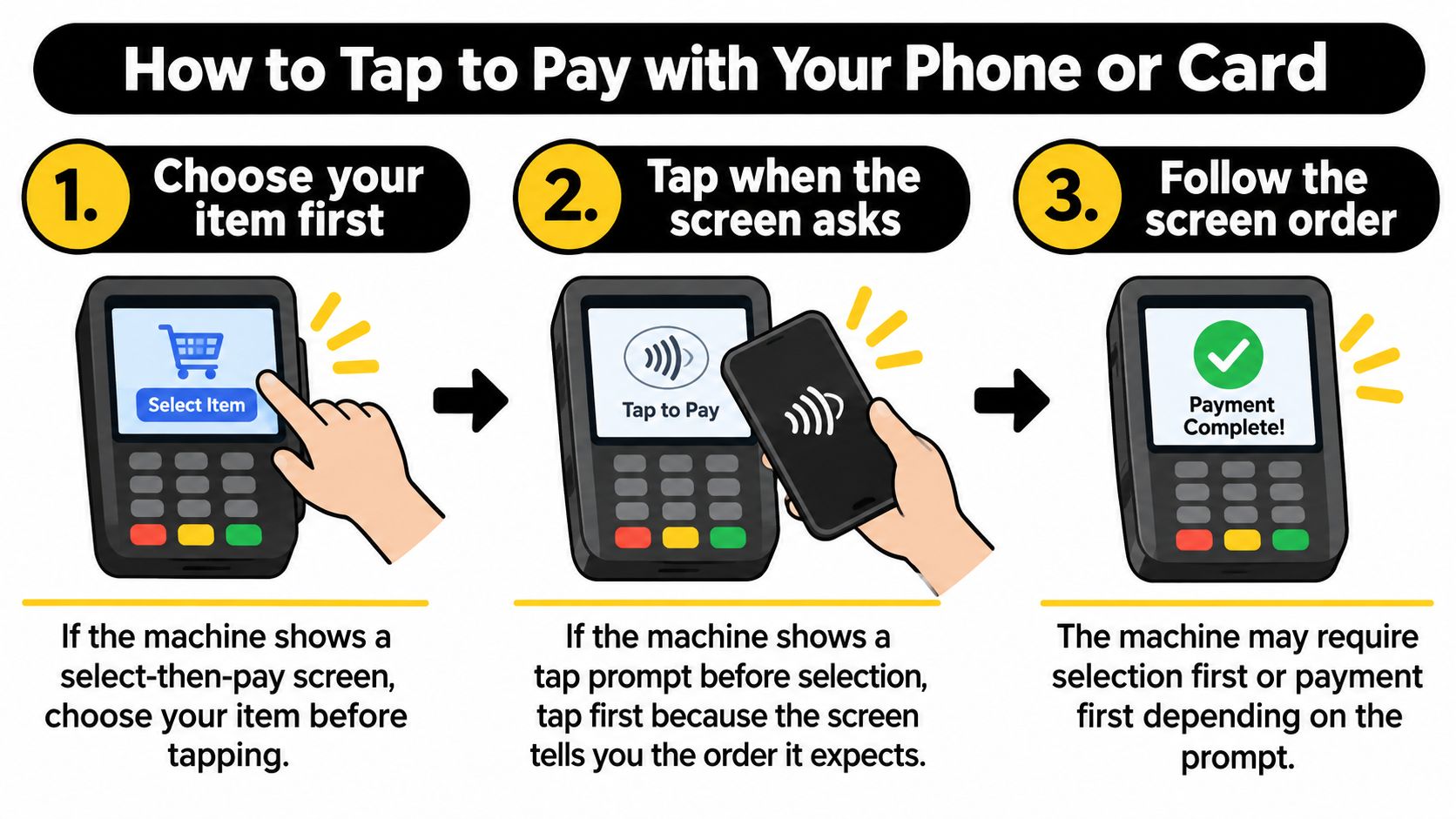
Follow the screen order. If the machine shows a select then pay screen, choose your item first. If it shows a tap prompt before selection, tap first. The screen tells you which order it expects, and that order reserves payment for the right selection instead of charging for the wrong row.
Hold flat and still. Place your phone or card flat against the contactless symbol and keep it there until the screen changes, usually within a few seconds. Holding it at an angle, waving it, or pulling away early causes most no reads. Thick or magnetic cases can also weaken the signal, so if taps keep failing, DigiDevice's magnetic case buying guide is worth checking before you assume your phone is broken.
Confirm on your device. When your wallet asks for Face ID, Touch ID, or your passcode, complete it promptly. That check proves the owner is paying, and the reader won't proceed without it.
Wait for approved, and don't tap again. A working screen, a spinner, or a beep means the machine is talking to your bank. A second tap during that pause is the most common cause of a duplicate looking charge, so keep your hand still and let it finish.
Watch for the drop. Listen for the coil turning and check the tray before you step away. Approved on screen plus a product in the tray means parts one and two of the exchange both worked.
Check your record. Keep the receipt if one prints, or glance at the transaction in your wallet or bank app before you leave. You'll want that entry if anything looks wrong later.
For a chip card, skip the tap. Insert the card, leave it in while the machine processes, and remove it only when prompted. Pulling it early cancels the authorization.
Watch the full tap sequence here before you try it with someone waiting behind you.
What success actually looks like
You should see three things line up. The reader shows approved, the product drops, and a matching entry appears in your wallet or bank app within a few minutes. If one of those three is missing, don't repeat the whole process. Treat it as a failure case instead.
The reader itself runs on short range radio communication with your card or phone. If you're curious how that signal works, our explainer on contactless payment systems and RFID technology covers the mechanics without the jargon.
Hold still for one full second after you think the tap is done. Most failed reads I would blame on people pulling away half a second too soon.
Why a Cashless Payment Fails and How to Fix It
The most common failure is the simplest one: the screen says declined right away. That usually means insufficient funds, a card blocked for contactless use, or the wrong card selected in your wallet. Try the chip, or a different card, then check your bank app for a block or a fraud hold.
Decline codes mean different things to a bank than they do to you. If you sell online and see the same words from the merchant side, payment decline guidance for ecommerce merchants explains what those responses signal.
Cashless payment symptoms, causes and fixes
Symptom | Likely Cause | What to Do |
|---|---|---|
Card declined right away | Insufficient funds, a contactless block on the card, or the wrong card selected | Try the chip or another card, then check the bank app for a block |
Phone does not respond to the tap | Wallet locked, NFC switched off, or phone held too far from the symbol | Unlock the phone, turn on NFC, and hold it flat on the symbol for a second |
Approved but no product dropped | Dispensing fault after authorization | Note the machine ID, time and payment method, then contact the operator; a reversal should follow |
Two charges appear | A second tap during a slow response creates a pending authorization | Check the bank statement; a pending duplicate usually clears within a few business days |
Error or timeout on screen | Weak signal or outdated terminal software | Wait about 30 seconds, retry once, then switch to another method |
The stressful case is approved but nothing dropped. Your bank authorized the money, but the vending controller never confirmed delivery. Don't pay again. Note the machine ID, time, and card or wallet used, then contact the operator. A properly configured machine sends an automatic reversal when authorization succeeds and dispensing fails. That type of fault sits with the operator, and our notes on how to fix a vending machine payment fault show what happens on that side.
Two charges worry people most, and they're usually the least serious. A second tap during a slow response creates a pending authorization, which is a hold, not a settled charge. Holds typically drop off within a few business days, so check your statement before disputing anything.
Timeouts come from weak signal or stale terminal software. Wait about 30 seconds, retry once, then switch methods. Repeated retries only stack up more holds.
Call your card issuer or wallet provider, not the operator, when your card declines everywhere, your wallet locks you out, or a settled charge stays after several days. Call the operator when the machine took authorization and delivered nothing. That split saves you two phone calls.
Cashless Payment Without a Phone, Card or Data
Your phone's dead, or you have no signal in a hospital basement. Start by reading the front panel again. Each feature you can see, a contactless symbol, a chip slot, a cash slot, points to a different fallback.
Work through this order:
Tap a contactless card. A prepaid card carrying the contactless symbol works too, and it needs no network on your phone because the machine handles the connection.
Insert a chip card. Leave it in until the machine tells you to remove it.
Use cash if a slot is listed. Exact coins or bills the machine accepts, since change may be limited.
Ask for assisted help. A site manager or colleague can help where the site offers an assisted option.
Cash hasn't vanished, which is exactly why that slot still matters. Federal Reserve research found that cash represented 16% of all consumer payments in 2023, yet consumers still made an average of seven cash payments per month in 2023.
If you have a disability or limited experience with digital payments, ask the site manager or operator directly rather than struggling at the panel. Accepted methods should be visible before anyone walks up, so nobody gets stuck discovering the options under pressure.
Security and Privacy When You Tap to Pay
A tap protects your card data by design, then your habits keep that protection working.
Mobile wallets and many contactless cards use payment tokenization, which replaces your real account number with a payment token. The machine never handles your actual card number. Each contactless transaction can also use a one time security code, so intercepted transaction data isn't meant to be reusable for another purchase.
Device authentication adds the second check. When your wallet asks for Face ID, Touch ID, or your passcode, it's confirming you're the owner. That only works if your phone itself is protected, so use a strong passcode and keep the lock screen on. A phone left open can be used to pay by whoever picks it up.
If you lose your phone, suspend or remove the card through your wallet provider, or call your card issuer right away. Check your bank app regularly, and report any charge you don't recognize to your issuer, not the vending operator, because the issuer runs fraud disputes. Our overview of mobile payment security goes deeper on tokenization and device locks.
Never share your wallet unlock with anyone, including someone offering to help you at the machine. Hand them cash instead if you trust them.
Setup Checklist for Facility Managers
If you run a break room, campus, or clinic, dependable cashless payment isn't a reader bolted to a door. It's a workflow. Use this checklist before employees or patients ever tap.
The checklist below summarizes the six setup steps in order.
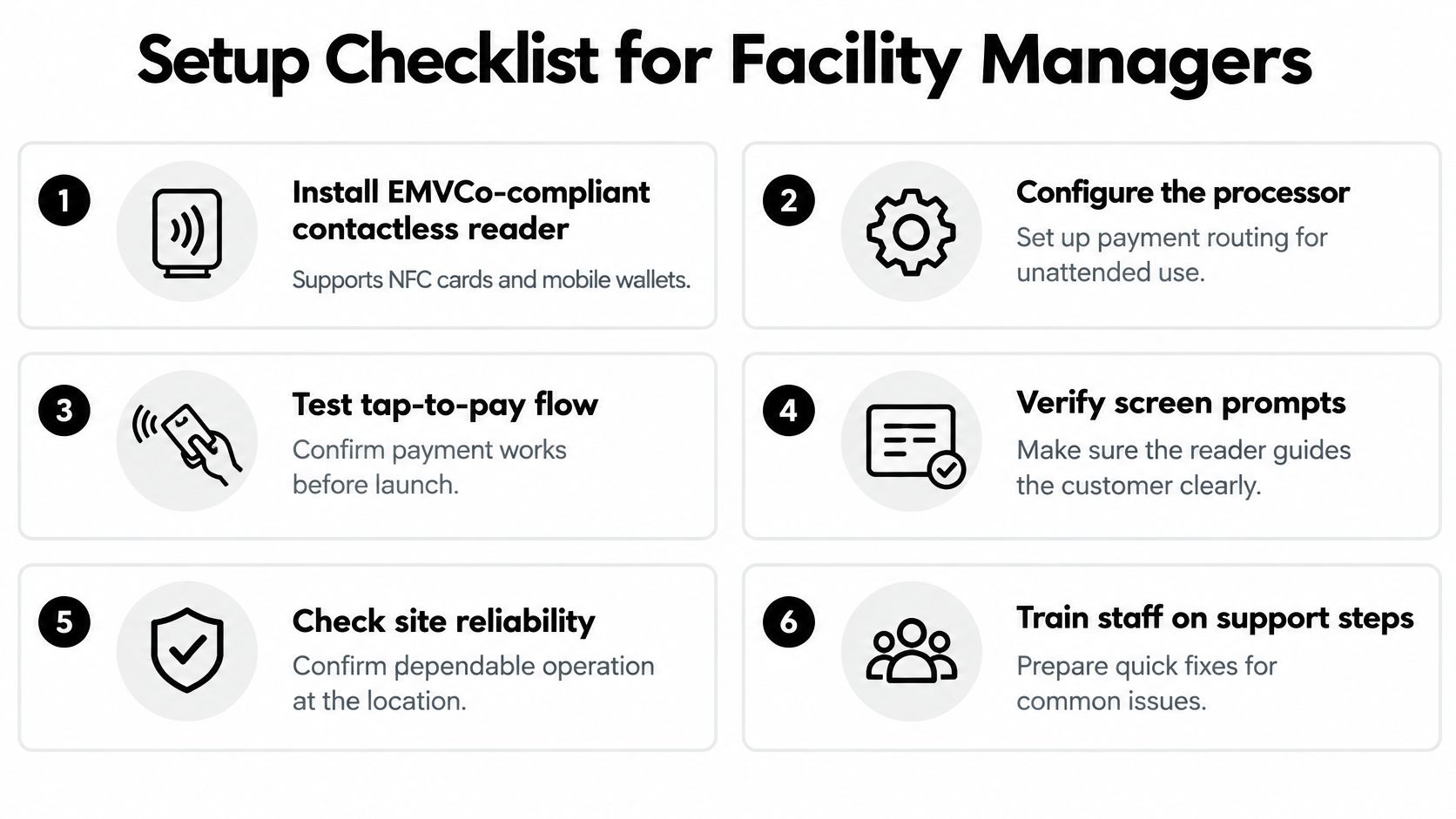
Install the reader: Deploy an EMVCo compliant contactless reader that supports NFC cards and mobile wallets.
Configure the processor: Set it up for contactless authorization, reversal, refund, and settlement messages.
Enable the wallets: Turn on Apple Pay and Google Wallet through the terminal's certified payment kernel.
Show the instruction: Display a clear tap prompt, with a fallback for chip insertion or another tender type.
Monitor the site: Watch authorization latency, declines, offline transactions, reader health, and telemetry connectivity.
Reconcile daily: Match terminal totals against processor settlement every day.
Wallet support isn't just a hardware feature. As the EMVCo payment tokenisation specification framework describes, tokenization replaces the underlying primary account number with a payment token. Certification, processor configuration, terminal software, network reliability, and correct reversal handling all have to work together, or the reader taps fine and still leaves customers stuck. Our walkthrough on how to add a card reader to a vending machine covers the physical install side.
Test before launch, not after the first complaint. Run a successful tap, an insufficient funds attempt, a duplicate tap, interrupted connectivity, a canceled selection, a refund, and a receipt. Each one exposes a different weak point.
Then measure what matters: completed sale rate, meaning attempts that reach product delivery. Segment it by wallet, card network, location, time of day, and connectivity state. Investigate any gap between authorization and delivery, because that gap is where your customers lose trust and stop using the machine.
If your Oklahoma workplace, school, healthcare site, or public venue needs break room vending that people can pay for without coins, we install and manage cashless machines across Oklahoma City, Norman, Edmond, and surrounding areas. Tell us about your location and headcount through Vendmoore Enterprises and we'll recommend a machine and product mix that fits your site.
Comments